
Toyota Sienna Service Manual: Disassembly
1. INSPECT UNDERDRIVE PLANETARY GEAR PRELOAD
HINT: (See page AX-260)
2. REMOVE FRONT PLANETARY GEAR NUT
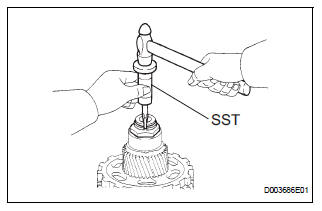
(a) Using SST, loosen the staked part of the lock nut.
SST 09930-00010 (09931-00010, 09931-00020), 09387-00050
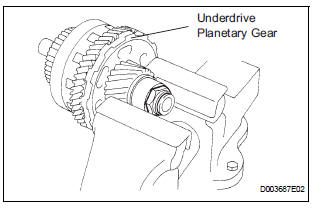
(b) Place the underdrive planetary gear in a soft jaw vise.
NOTICE: Be careful not to damage the differential drive pinion.
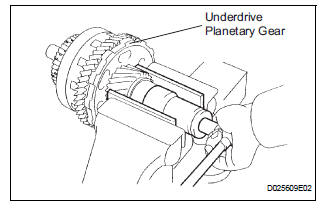
(c) Using a socket wrench, remove the lock nut.
3. REMOVE CYLINDRICAL ROLLER BEARING RACE INNER
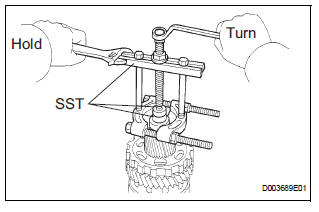
(a) Using SST, remove the cylindrical roller bearing race inner.
SST 09950-00020, 09950-00030, 09950-60010 (09951-00320, 09957-04010)
4. REMOVE UNDERDRIVE PLANETARY GEAR ASSEMBLY
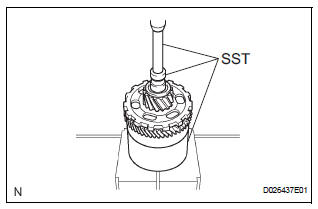
(a) Using SST and a press, remove the differential drive pinion, parking lock gear, counter driven gear with underdrive planetary ring gear and radial ball bearing front.
SST 09950-60010 (09951-00320), 09387-00050, 09950-00020, 09950-00030, 09950-40011 (09957-04010)
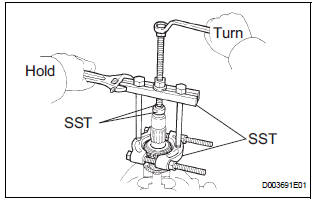
(b) Place the underdrive planetary gear in a soft jaw vise.
(c) Using SST, remove the radial ball bearing rear from the underdrive planetary gear
SST 09950-60010 (09951-00320), 09950-00030, 09950-40011 (09957-04010)
5. REMOVE UNDERDRIVE PLANETARY RING GEAR
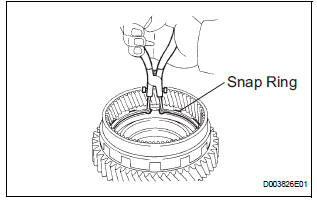
(a) Using a snap ring pliers, remove the snap ring.
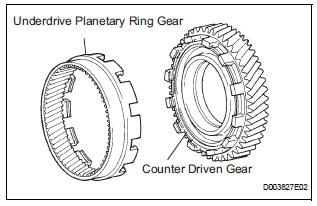
(b) Remove the underdrive planetary ring gear from the counter driven gear.
 Underdrive planetary gear
COMPONENTS
...
 Inspection
1. INSPECT UNDERDRIVE PLANETARY GEAR PRELOAD
(a) Using SST, fix the underdrive planetary gear
assembly.
SST 09387-00050
(b) Using SST and a torque wrench, measure the
turning torque of th ...
Other materials:
Rear Room Temperature Sensor Circuit
DESCRIPTION
This sensor detects the rear cabin temperature that is used as the basis for
temperature control and
sends a signal to the A/C amplifier.
WIRING DIAGRAM
INSPECTION PROCEDURE
1 READ VALUE OF INTELLIGENT TESTER
(a) Connect the intelligent tester to the DLC3.
(b) Turn the ign ...
TS and CG Terminal Circuit
DESCRIPTION
In the sensor check mode, a malfunction of the speed sensor that cannot be
detected when the vehicle is
stopped is detected while driving.
Transition to the sensor check mode can be performed by connecting terminals TS
and CG of the DLC3
and turning the ignition switch from off ...
Outer mirror switch
Inspection
1. INSPECT OUTER MIRROR SWITCH ASSEMBLY (w/o
Memory)
The L side of the left / right adjustment switch:
Inspect the mirror switch resistance.
Standard resistance (Left side)
If the result is not as specified, replace the switch
assembly.
The R side of t ...
