
Toyota Sienna Service Manual: Dtc check / clear
1. DTC CHECK (SENSOR CHECK)
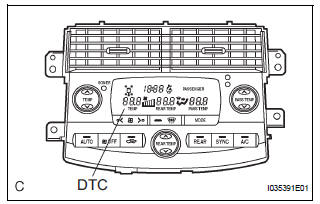
(a) After the indicator check is completed, the system enters the DTC check mode automatically.
(b) Read the codes displayed on the panel. Refer to the list of codes (See page AC-19) when reading the codes. (Trouble codes are output at the temperature display.)
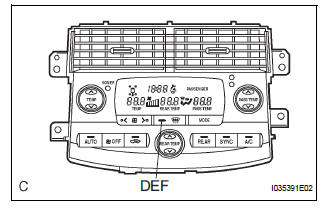
(c) If the slower display is desired, press the DEF switch and change it to the step operation. Each time the DEF switch is pressed, the display changes by 1 step.
2. CLEARING DTC
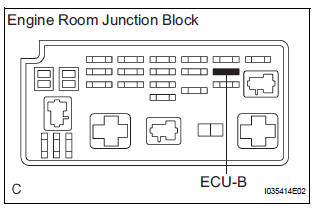
(a) To clear diagnostic trouble codes, there are 2 ways.
(1) During sensor check, press the "DEF" switch and "A/C" switch at the same time.
(2) Remove the ECU-B fuse in the engine room junction block for 20 seconds or longer to clear the DTC memory.
 Diagnosis system
1. CHECK DLC3
(a) The vehicle's ECM uses the ISO 15765-4 for
communication. The terminal arrangement of the
DLC3 complies with SAE J1962 and matches the
ISO 15765-4 format.
HINT:
Connect the ...
 Check mode procedure
1. LIST OF OPERATION METHODS
By operating each of the A/C control switches as shown
in the diagram below, it is possible to enter the diagnosis
check mode.
...
Other materials:
Disc cannot be Played/ No Playable Files/ Copyright Protection Error
DTC 63-7D Disc cannot be Played
DTC 63-7E No Playable Files
DTC 63-7F Copyright Protection Error
DESCRIPTION
DTC No.
DTC Detection Condition
Trouble Area
63-7D
An incompatible MP3 / WMA file is used.
Although the file has an extension of &quo ...
Right Front Wheel Speed Sensor Signal
DESCRIPTION
The speed sensor detects wheel speed and sends the appropriate signals to the
ECU. These signals are
used to control the ABS control system. The front and rear rotors have 48
serrations each.
When the rotors rotate, the magnetic field emitted by the permanent magnet in
t ...
Automatic Light Control Sensor Circuit
DESCRIPTION
The Multiplex network body ECU receives the signal from the automatic light
control sensor.
HINT:
DTC code is output when malfunction of automatic light control sensor or open or
short of automatic light
control sensor circuit occurs.
WIRING DIAGRAM
INSPECTION PROCEDURE
...
