
Toyota Sienna Service Manual: ECU Power Source Circuit
DESCRIPTION
The position control ECU and switch assembly (power seat control switch and ECU) is contained in the switch assembly.
During manual operation, only one switch signal is accepted. If signals are input from 2 or more switches simultaneously, all of them are ignored, except when signals are input from the front vertical switch and lifter switch simultaneously. In this case, the signal from the lifter will operate.
During automatic operation, a manual switch input will override any other operations, i.e. automatic operations will stop and the manual input operation only will be accepted. For example, if a manual switch input is activated during a seat store/restore operation, the previous operation will cease and manual operation will be performed. After the manual operation is performed, the previous automatic operation will not resume.
The power mirror store/restore operation is unaffected by manual switch inputs.
The front power seat switch does not allow the restore operation of the power seat when the system detects that the voltage of terminal SYSB is less than 8.0 +- 0.5 V for 30 msec. or is more than 10 +- 0.5 V for 30 msec.
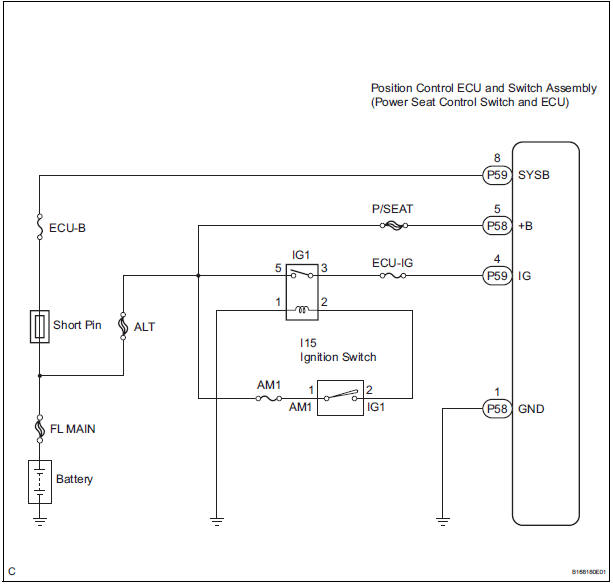
This circuit is the power source circuit for the position control ECU and switch assembly (power seat control switch and ECU).
HINT:
- Manual adjustment of the slide and reclining can be performed even when the front power seat switch is not functional if current is allowed to flow into terminals +B and SYSB.
- The lumber support function can always be used because its circuit does not include the ECU and differs from other functions (reclining, slide, lifter, and front vertical functions.)
WIRING DIAGRAM
INSPECTION PROCEDURE
1 INSPECT POSITION CONTROL ECU AND SWITCH ASSEMBLY (POWER SEAT CONTROL SWITCH AND ECU POWER SOURCE CIRCUIT)
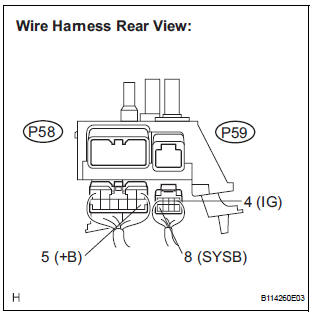
- Disconnect the position control ECU and switch assembly connectors.
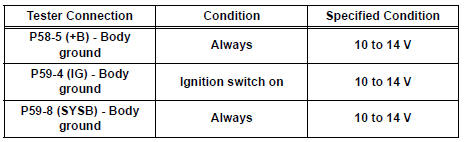
- Measure the voltage according to the value(s) in the table below.
Standard voltage
2 INSPECT POSITION CONTROL ECU AND SWITCH ASSEMBLY (POWER SEAT CONTROL SWITCH AND ECU GROUND CIRCUIT)
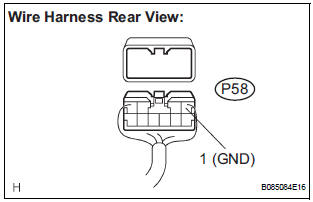
- Measure the resistance according to the value(s) in the table below.
Standard resistance

PROCEED TO NEXT CIRCUIT INSPECTION SHOWN IN PROBLEM SYMPTOMS TABLE
 Driving Position Memory Switch Circuit (w/ Memory)
DESCRIPTION
The seat memory switch sends signals to the outer mirror control ECU LH via
the multiplex
communication system to memorize a given seat position. This memory system does
not use a po ...
 Seat heater system
PARTS LOCATION
...
Other materials:
Inspection
1. INSPECT BRAKE CYLINDER AND PISTON
(a) Check the brake cylinder bore and front disc brake
piston for rust or scoring.
2. INSPECT PAD LINING THICKNESS
(a) Using a ruler, measure the pad lining thickness.
Standard thickness:
12.0 mm (0.472 in.)
Minimum thickness:
1.0 mm (0.039 in.)
3. ...
On-vehicle inspection
1. INSPECT COOLING FAN SYSTEM
(a) Put the vehicle in the following conditions
(1) The engine switch is off.
(2) The coolant temperature is less than 95°C
(203°F).
(3) The battery voltage is between 9 and 14 V.
(4) The A/C switch is OFF.
(b) Clamp the 400 A probe of an ammeter over the ...
Knock Sensor Circuit Low Input/ Knock Sensor Circuit High Input
DTC P0327 Knock Sensor 1 Circuit Low Input (Bank 1 or
Single Sensor)
DTC P0328 Knock Sensor 1 Circuit High Input (Bank 1 or
Single Sensor)
DTC P0332 Knock Sensor 2 Circuit Low Input (Bank 2)
DTC P0333 Knock Sensor 2 Circuit High Input (Bank 2)
DESCRIPTION
A flat type knock sensor (non-resona ...
