
Toyota Sienna Service Manual: Evaporator temperature sensor (for rear air conditioning system)
ON-VEHICLE INSPECTION
1. INSPECT REAR A/C EVAPORATOR TEMPERATURE SENSOR
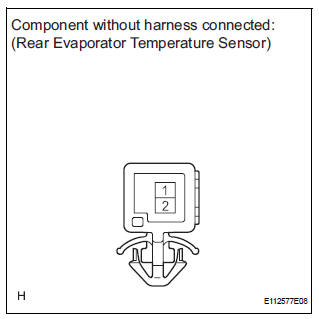
(a) Remove the rear evaporator temperature sensor.
(b) Disconnect the connector from the rear evaporator temperature sensor.
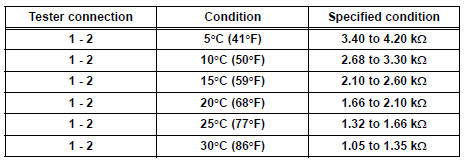
(c) Measure the resistance according to the value(s) in the table below.
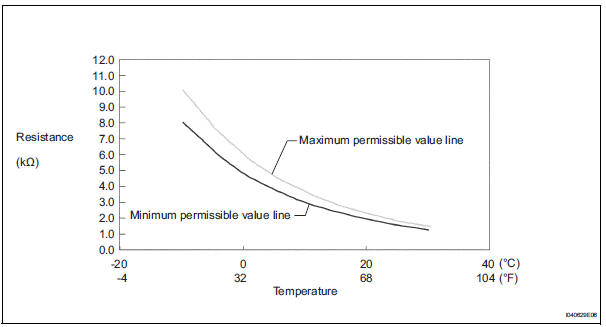
Standard resistance 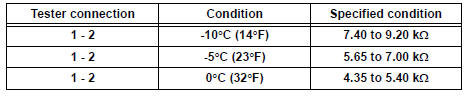
NOTICE:
- Even slightly touching the sensor may change the resistance value. Be sure to hold the connector of the sensor.
- When measuring the sensor temperature must be the same as the ambient temperature.
HINT: As the temperature increases, the resistance decreases (see the graph).
If the resistance is not as specified, replace the rear evaporator temperature sensor.
 Evaporator temperature sensor
ON-VEHICLE INSPECTION
1. INSPECT A/C EVAPORATOR TEMPERATURE SENSOR
(a) Remove the A/C evaporator temperature sensor (A/
C thermistor).
(b) Disconnect the connector from the A/C evaporator
t ...
 Air conditioning pressure sensor
ON-VEHICLE INSPECTION
1. INSPECT A/C PRESSURE SENSOR
(a) Install the manifold gauge set.
(b) Disconnect the connector from the A/C pressure
sensor.
(c) Connect the three 1.5 V dry cell ba ...
Other materials:
Installation
1. INSTALL THROTTLE BODY
(a) Install a new throttle body gasket to the intake air
surge tank.
(b) Install the throttle body with the 4 bolts.
Torque: 10 N*m (102 kgf*cm, 7 ft.*lbf)
(c) Connect the 2 water by-pass hoses.
(d) Connect the throttle body connector and clamp.
2. INSTA ...
Power seat switch
Inspection
1. INSPECT FRONT POWER SEAT SWITCH
Inspect the driver side power seat switch.
Measure the resistance according to the
value(s) in the table below.
Standard resistance:
Slide switch
Front vertical switch
Lifter switch
Reclining switch
If the res ...
Rear Occupant Classification Sensor RH Collision
Detection
DTC B1788 Rear Occupant Classification Sensor RH Collision
Detection
DESCRIPTION
DTC B1788 is output when the occupant classification ECU receives a collision
detection signal sent by
the rear occupant classification sensor RH if an accident occurs.
DTC B1788 is also output when the front s ...
