
Toyota Sienna Service Manual: Initialization procedure
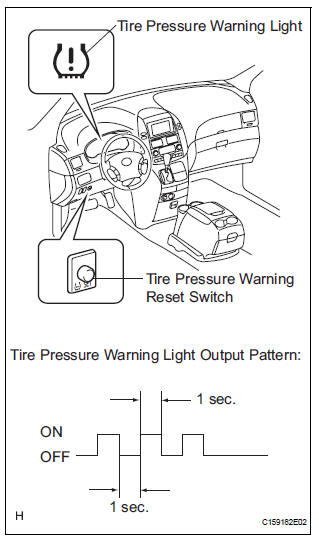
(a) Make sure that the ignition switch is off.
(b) Connect the intelligent tester to the DLC3.
(c) Turn the ignition switch to the ON position.
(d) Select "TIREPRESS" by following the prompts displayed on the intelligent tester.
(e) Press the tire pressure warning reset switch within 30 seconds after turning the ignition switch ON.
Keep the tire pressure warning reset switch pressed for 3 seconds or more with the ignition switch ON.
(f) Check that the tire pressure warning light blinks 3 times (1 second ON, 1 second OFF).
HINT: Initialization will be completed if signals are received from all the wheels.
(g) Wait for 5 to 6 minutes with the ignition switch ON.
NOTICE:
- The initialization is normally completed within 5 to 6 minutes.
- If the initialization has not been completed successfully, DTC C2177/77 is set after the vehicle is driven for 20 minutes or more.
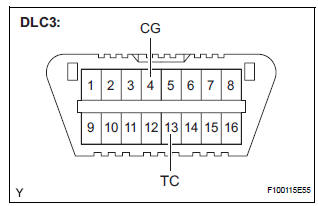
- The initialization can be terminated by connecting terminals TC and CG of the DLC3 connector.
 Description of initialization
(a) Perform initialization in the following cases:
Before delivery of a new vehicle.
After replacement of the tire pressure warning
ECU*.
After replacement of the tire pressure warning
val ...
 Check that initialization has been completed
(a) Confirm that the data of tire pressure of all tires are
displayed on the intelligent tester screen.
Tester Display
Measurement Item/Range
Normal Condition
Diagnostic Note
...
Other materials:
Battery
Check the battery as follows:
Battery exterior
Make sure that the battery terminals are not corroded and that
there are no loose connections, cracks, or loose clamps.
Terminals
Hold-down clamp
Before recharging
When recharging, the battery produces hydrogen gas which is flammable an ...
DTC check / clear
1. DTC CHECK/CLEAR (USING INTELLIGENT TESTER:)
DTC check
Connect the intelligent tester to the DLC3.
Turn the ignition switch to the ON position.
Read the DTCs on the tester screen.
DTC clear
Connect the intelligent tester to the DLC3.
&n ...
On-vehicle inspection
1. INSPECT SIDE AIRBAG SENSOR (VEHICLE NOT
INVOLVED IN COLLISION)
Perform a diagnostic system check.
2. INSPECT SIDE AIRBAG SENSOR (VEHICLE
INVOLVED IN COLLISION AND AIRBAG HAS NOT
DEPLOYED)
Perform a diagnostic system check.
When the center pillar of the vehicle or its a ...
