
Toyota Sienna Service Manual: Inspection
1. INSPECT BRAKE CYLINDER AND PISTON
(a) Check the brake cylinder bore and front disc brake piston for rust or scoring.
2. INSPECT PAD LINING THICKNESS
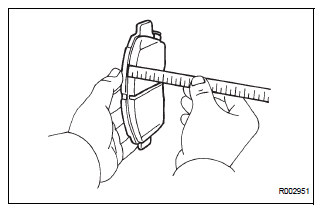
(a) Using a ruler, measure the pad lining thickness.
Standard thickness: 12.0 mm (0.472 in.) Minimum thickness: 1.0 mm (0.039 in.)
3. INSPECT FRONT DISC BRAKE PAD SUPPORT PLATE
(a) Inspect the front disc brake pad support plate (No.
1) and front disc brake pad support plate (No. 2).
Make sure that they have sufficient rebound, no deformation, cracks or wear, and have had all rust and dirt cleaned off
4. INSPECT DISC THICKNESS
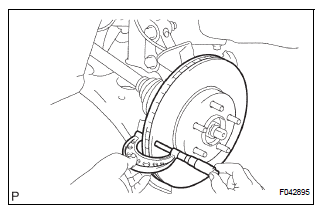
(a) Using a micrometer, measure the disc thickness.
Standard thickness: 28.0 mm (1.102 in.) Minimum thickness: 26.0 mm (1.024 in.)
 Disassembly
1. REMOVE FRONT DISC BRAKE BUSH DUST BOOT
(a) Using soft jaws on the vise, hold the front disc brake
cylinder mounting LH in the vise through aluminum
plates.
(b) Using a screwdriver and ham ...
 Reassembly
1. INSTALL FRONT DISC
(a) Aligning the matchmarks, install the front disc.
HINT:
Select the installation position where the disc has
the minimum runout.
2. INSPECT DISC RUNOUT
(a) Temporaril ...
Other materials:
Speaking on the phone
The following screen is displayed when speaking on the phone.
To adjust the call volume
Select “-� or “+�. You can also adjust the volume using the steering
switches or the volume knob.
To prevent the other party from hearing your voice
Select “Mute�.
Inputting tones
When usin ...
Listening to a
USB memory device
Connecting a USB memory device enables you to enjoy music
from the vehicle speakers.
Touch “USB� on the audio source selection screen.
Connecting a USB memory device
Audio control screen
Pressing the “AUDIO� button displays the audio control screen from
any screens of the selected so ...
Phone Display Settings
Display the “Phone/Message Settings� screen.
Select “Phone Display Settings�.
Select the desired item to be set.
Change the incoming call
display.
“Full Screen�: When a call is
received, the hands-free screen
is displayed and can be operated
on the screen.
...
