
Toyota Sienna Service Manual: Installation
1. INSTALL REAR NO. 2 SEAT ASSEMBLY
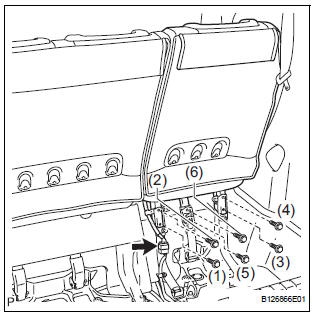
- Lock the seat leg rear to the floor striker.
- Lock the seat leg front to the floor striker.
- Install the rear No. 2 seat assembly with the 6 bolts.
Torque: 19 N*m (194 kgf*cm, 14 ft.*lbf)
NOTICE: Tighten the bolts in the order shown in the illustration.
- Connect the connector.
2. INSTALL NO. 2 SEAT HINGE COVER
3. INSTALL REAR SEAT LEG SIDE GARNISH SUBASSEMBLY
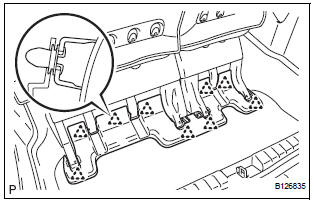
- Install 4 new clips to the rear seat leg side garnish sub-assembly.
- Engage the 4 clips and install the rear seat leg side garnish sub-assembly.
4. INSTALL REAR NO. 2 SEAT LEG SIDE GARNISH SUB-ASSEMBLY
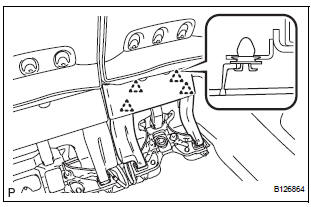
- Install 9 new clips to the rear No. 2 seat leg side garnish sub-assembly.
- Engage the 4 clips and install the rear No. 2 seat leg side garnish sub-assembly.
5. CONNECT CABLE TO NEGATIVE BATTERY TERMINAL
6. CHECK POWER REAR NO. 2 SEAT WITH STOWING FUNCTION
7. PERFORM INITIALIZATION
Some systems need initialization after reconnecting the cable to the negative battery terminal.
 Reassembly
1. INSTALL NO. 2 SEAT LEG SUB-ASSEMBLY
Install the No. 2 seat leg sub-assembly with the 3
bolts and nut.
Torque: 19 N*m (194 kgf*cm, 14 ft.*lbf)
NOTICE:
Tighten the bolts and nut ...

Other materials:
Precaution
1. PRECAUTION FOR VEHICLE WITH SRS AIRBAG
AND SEAT BELT PRETENSIONER
Some operations in this section may affect SRS
airbag system. Before performing the corresponding
operations, please read the NOTICE of the SRS
airbag for the proper operations.
COMPONENTS
...
Precaution
NOTICE:
Perform the RESET MEMORY (AT initialization) when
replacing the automatic transaxle assembly, engine
assembly or ECM (See page AX-16).
Perform the REGISTRATION (VIN registration) when
replacing the ECM (See page ES-15).
HINT:
RESET MEMORY can not be ...
Installation
HINT:
Install the RH side by the same procedure as the LH side.
1. INSTALL REAR SPEED SENSOR
(a) Clean the contacting surface of the axle hub and a
new skid control sensor.
NOTICE:
Keep the sensor rotor clean.
(b) Place the speed sensor on the axle hub so that the
connector is positioned ...
