
Toyota Sienna Service Manual: Installation
1. INSTALL PARK/NEUTRAL POSITION SWITCH ASSEMBLY
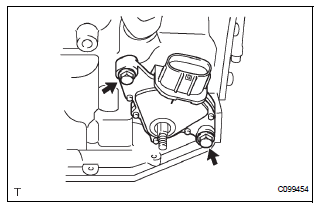
(a) Install the park/neutral position switch to the manual valve shaft.
(b) Temporarily install the 2 bolts.
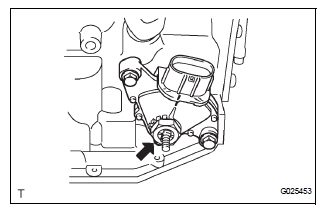
(c) Place a new lock plate and tighten the nut.
Torque: 6.9 N*m (70 kgf*cm, 61 in.*lbf) (d) Temporarily install the control shaft lever.
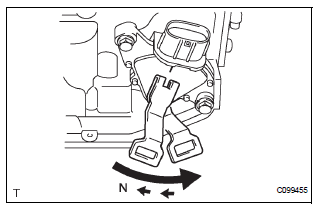
(e) Turn the lever counterclockwise until it stops, then turn it clockwise 2 notches.
(f) Remove the control shaft lever.
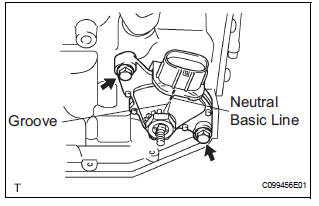
(g) Align the groove with the neutral basic line.
(h) Hold the switch in position and tighten the 2 bolts.
Torque: 5.4 N*m (55 kgf*cm, 48 in.*lbf)
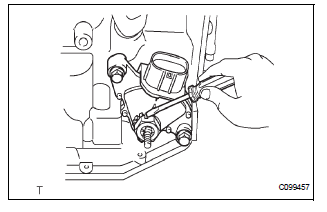
(i) Using a screwdriver, bend the tabs of the lock plate.
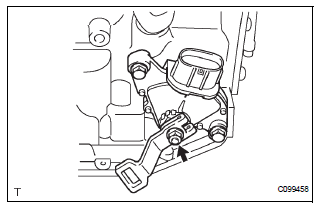
(j) Install the control shaft lever, washer and the nut.
Torque: 13 N*m (130 kgf*cm, 9 ft.*lbf)
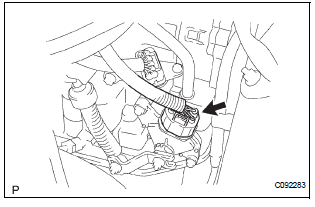
(k) Connect the park/neutral position switch connector
2. CONNECT TRANSMISSION CONTROL CABLE ASSEMBLY
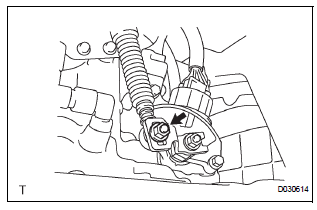
(a) Connect the control cable to the control shaft lever with the nut.
Torque: 13 N*m (133 kgf*cm, 10 ft.*lbf)
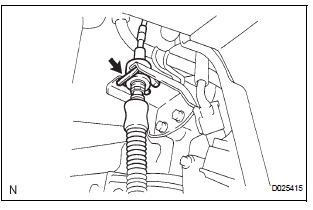
(b) Install the control cable with a new clip to the bracket.
3. ADJUST PARK/NEUTRAL POSITION SWITCH ASSEMBLY (See page AX-127)
4. INSPECT PARK/NEUTRAL POSITION SWITCH ASSEMBLY OPERATION (See page AX-126)
5. INSPECT SHIFT LEVER POSITION (See page AX-148)
6. ADJUST SHIFT LEVER POSITION (See page AX-149)
7. INSTALL AIR CLEANER ASSEMBLY
HINT: (See page EM-44)
8. INSTALL BATTERY
 Inspection
1. INSPECT PARK/NEUTRAL POSITION SWITCH ASSEMBLY OPERATION
(a) Apply the parking brake and turn the ignition switch
to the ON position.
(b) Depress the brake pedal and check that the engine
star ...
Other materials:
Front No. 1 speaker
COMPONENTS
ON-VEHICLE INSPECTION
1. INSPECT FRONT NO.1 SPEAKER
HINT:
Remove interior parts so that the front No.1 speaker can
be seen.
Check the speaker installation.
OK:
The speaker is securely installed.
If the result is not as specified, reinstall the front
No.1 spe ...
Seat belt warning system
PARTS LOCATION
Problem symptoms table
SEAT BELT WARNING SYSTEM
Symptom
Suspected Area
Driver side seat belt waning light does not operate
Fuse
Combination meter
Center airbag sensor assembly
Front seat inner belt assembly
Wire harness
...
Hazard warning switch
INSPECTION
1. HAZARD WARNING SIGNAL SWITCH ASSEMBLY
Check that there is resistance between the
terminals at each switch position as shown in the
chart.
Resistance
Inspect illumination operation.
Connect the positive (+) lead from the battery
to the termina ...
