
Toyota Sienna Service Manual: Adjustment
1. INSPECT SHIFT LEVER POSITION
(a) When shifting from P to R position only with ignition switch ON and brake pedal, make sure that the shifting lever moves smoothly and can be moderately operated.
(b) When starting engine, make sure that the vehicle moves forward when shifting from N to D position and moves rearward when shifting to R position.
2. ADJUST SHIFT LEVER POSITION
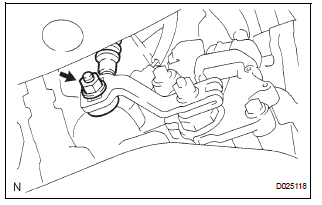
(a) Loosen the nut on the control shaft lever
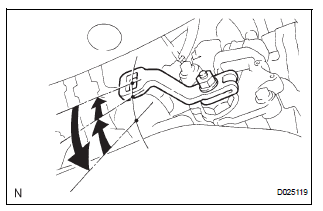
(b) Push the control shaft fully downward.
(c) Return the control shaft lever 2 notches to the N position.
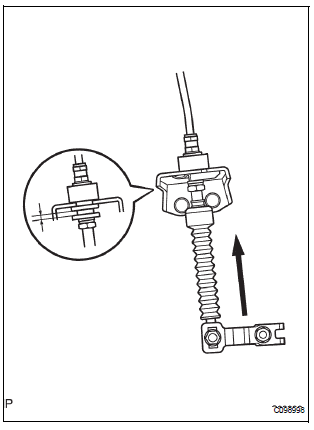
(d) While pushing the control cable end up with the shift lever in the N position, install it to the control shaft lever with the nut.
Torque: 13 N*m (132.6 kgf*cm, 9.5 ft.*lbf)
NOTICE:
- If the control cable end is excessively pushed up, the shift lever can not be adjusted.
- When tightening the nut, confirm that the control cable is properly stretched.
(e) Start the engine and make sure that the vehicle moves forward when shifting the lever from the N to D position and moves rearward when shifting it to the R position.
 Removal
1. Disconnect battery negative terminal
2. Remove instrument cluster finish panel
sub-assembly center
Hint:
(see page ip-9)
3. Remove transmission control cable assembly
(a) Remove the nut f ...
 Installation
1. INSTALL TRANSMISSION CONTROL CABLE ASSEMBLY
(a) Pull in the control cable to the body.
(b) Install the cable end, as shown in the illustration.
(c) When installing the transmission con ...
Other materials:
Transmitter battery
REPLACEMENT
1. REMOVE TRANSMITTER BATTERY
NOTICE:
Special caution should be taken for handling each
component as they are precision electronic
components.
Using a coin or the equivalent, pry out the
transmitter case.
NOTICE:
Do not forcibly pry out the case.
Re ...
Removal
1. Disconnect cable from negative battery
terminal
2. REMOVE HEATED OXYGEN SENSOR (for Bank 1
Sensor 2) (See page EC-32)
3. REMOVE TAIL EXHAUST PIPE ASSEMBLY
(a) Remove the 2 bolts.
(b) Disconnect the 3 exhaust pipe supports and remove
the tail exhaust pipe assembly.
(c) Remove the gas ...
On-vehicle inspection
1. INSPECT SPEEDOMETER
Check the operation.
Using a speedometer tester, check the
speedometer indication according to the table
below.
Reference: mph (U.S.A.)
Reference: km/h (Canada)
NOTICE:
Tire wear as well as over or under inflation
will cause errors.
...
