
Toyota Sienna 2010-2026 Owners Manual: Optimal use of the audio system
On the “Sound Settings� screen, sound quality (Treble/Mid/ Bass), volume balance can be adjusted.
How to adjust the sound settings and sound quality
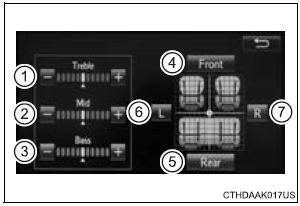
1, 2, 3 Select “-� or “+� to adjust the treble, mid or bass to a level between -5 and 5.
4, 5 Select “Front� or “Rear� to adjust the front/rear audio balance.
6, 7 Select “L� or “R� to adjust the left/right audio balance
The sound quality level is adjusted individually
The treble, mid and bass levels can be adjusted for each audio mode separately.
 Selecting, fast-forwarding and reversing tracks/files/songs
Selecting a track/file/song
Press the “� or “� button on “SEEK•TRACK� or turn the
“TUNE•SCROLL� knob to select the desired track/file/song number.
To fast-forw ...
 Using the radio
Radio operation
Select “AM� or “FM� on the audio source selection screen to
begin listening to the radio.
Audio control screen
Pressing the “AUDIO� button displays the audio control sc ...
Other materials:
Inspection
1. INSPECT PRELOAD
(a) Using SST(s) and a torque wrench, check the initial
torque within the backlash range.
SST 09326-20011
Torque: 0.9 to 1.4 N*m (9 to 14 kgf*cm, 8.0 to
12.4 in.*lbf)
HINT:
Use a torque wrench with a fulcrum length of 160
mm (6.30 in.).
(b) Using SST(s) and a torque w ...
Problem symptoms table
HINT:
Use the table below to help determine the cause of the
problem symptom. The likely causes of the problem are
indicated in descending order. Check each suspected area
in order. Repair or replace faulty parts or perform
adjustments as necessary.
Inspect the fuse and rel ...
Installation
1. INSTALL FRONT SUSPENSION ARM SUBASSEMBLY LOWER NO.1 LH
(a) Install the front lower arm bush stopper to the front
suspension arm sub-assembly lower No.1 LH.
(b) Install the bolt and nut to the rear side of the front
suspension arm sub-assembly lower No.1 LH.
Torque: 206 N*m (2,100 kgf ...
