
Toyota Sienna Service Manual: Rear wiper rubber
COMPONENTS
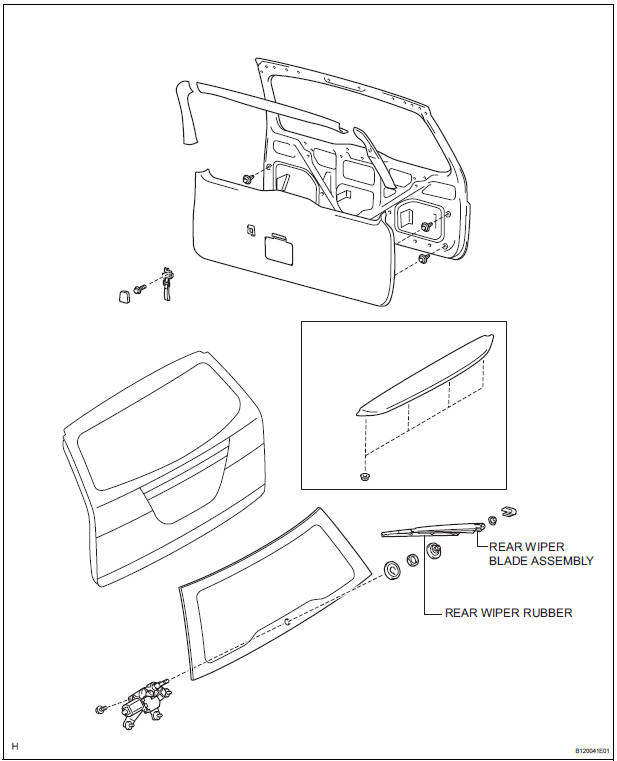
REMOVAL
1. REMOVE REAR WIPER BLADE ASSEMBLY
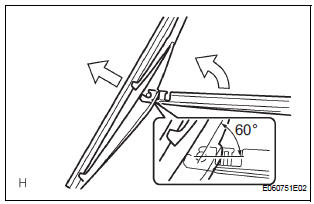
- Remove the rear wiper arm head cap from the rear wiper arm.
- Raise the rear wiper blade to the position as shown
in the illustration where the meshing of the claw is
disengaged with the click sound.
NOTICE: Be careful not to break the claw.
- Pull the rear wiper blade straight from the wiper arm toward the left side of the vehicle.
NOTICE: Do not fold the rear wiper arm with the rear wiper blade being removed from it.
2. REMOVE REAR WIPER RUBBER
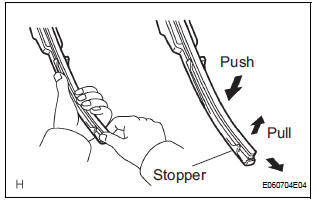
- Pull the end of the rubber protruded from the blade stopper as shown in the illustration.
NOTICE: Do not pull out the wiper rubber forcibly.
Otherwise, the backing plates are deformed or blade claw is damaged. HINT: Pushing the position close to the middle of the blade raises the rubber, making easier to pull the rubber out.
INSTALLATION
1. INSTALL REAR WIPER RUBBER
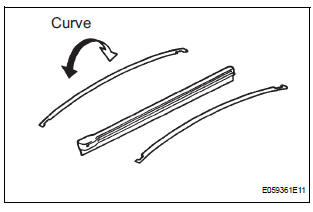
- Install the 2 wiper rubber backing plates to the rear wiper rubber.
NOTICE: Be sure to install the wiper rubber backing plates in the right direction.
 Rear wiper motor and bracket
COMPONENTS
REMOVAL
1. REMOVE REAR WIPER ARM
Remove the rear wiper arm head cap from the rear
wiper arm.
Remove the nut and the rear wiper arm.
2. REMOVE BACK DOOR GARN ...
 Wiper switch
COMPONENTS
REMOVAL
1. REMOVE STEERING COLUMN COVER
2. REMOVE WINDSHIELD WIPER SWITCH ASSEMBLY
Disconnect the connector.
Using a screwdriver, disengage the claw and pull
...
Other materials:
Power Window can be Operated After Ignition Switch is Turned OFF
Even if Operative Conditions are not Met
DESCRIPTION
The multiplex network body ECU controls power supplied to the power window
master switch and each
regulator switch continuously for 45 seconds after the ignition switch is turned
OFF unless the front doors
have been opened, so that the power window can be operated during this peri ...
Mass or Volume Air Flow Circuit
DESCRIPTION
The Mass Air Flow (MAF) meter is a sensor that measures the amount of air
flowing through the throttle
valve. The ECM uses this information to determine the fuel injection time and to
provide appropriate airfuel
ratio. Inside the MAF meter, there is a heated platinum wire whic ...
Power Slide Door LH does not Operate When Using Inside / Outside
Handle
DESCRIPTION
The inside / outside handles have the ability to control operation
of the power slide door. Pulling either
handle transmits a request signal to the power slide door ECU LH, which then
commands the power
slide door control motor and clutch to open / close the power sli ...
