
Toyota Sienna Service Manual: Removal
NOTICE:
- Do not adjust the brake booster push rod.
- Do not change the combination of the diameter converting unit and brake.
1. REMOVE FRONT WHEEL
2. DRAIN BRAKE FLUID
NOTICE: Wash the brake fluid off immediately if it attaches to any painted surfaces.
3. SEPARATE BATTERY NEGATIVE TERMINAL
4. REMOVE FRONT DOOR SCUFF PLATE LH
5. REMOVE COWL SIDE TRIM BOARD LH
(a) Remove the nut and cowl trim board plate LH.
6. REMOVE INSTRUMENT PANEL FINISH PANEL SUBASSEMBLY LOWER LH
(a) Remove the 2 bolts and instrument panel finish panel sub-assembly lower LH.
7. REMOVE INSTRUMENT PANEL SAFETY PAD INSERT SUB-ASSEMBLY NO. 1
(a) Remove the 4 bolts and instrument panel safety pad insert sub-assembly No. 1.
8. REMOVE COWL TOP PANEL SUB-ASSEMBLY OUTER FRONT (See page SP-13)
9. REMOVE AIR CLEANER ASSEMBLY WITH HOSE
10. REMOVE BRAKE ACTUATOR ASSEMBLY (w/o VSC) SST 09023-00101
HINT: See page BC-184.
11. REMOVE ABS & TRACTION ACTUATOR ASSEMBLY (w/ VSC)
SST 09023-00101
HINT: See page BC-179.
12. REMOVE BRAKE LINE
(a) Remove the front brake tube No. 1, front brake tube No. 2, front brake tube No. 3 and front brake tube No. 4.
(b) Remove the rear brake tube No. 1 and rear brake tube No. 2.
13. REMOVE PUSH ROD PIN
(a) Remove the push rod pin from the brake booster push rod.
14. REMOVE BRAKE MASTER CYLINDER ASSEMBLY
(a) Slide the clip and disconnect the brake master cylinder reservoir hose from the brake master cylinder union.
(b) Slide the clip and disconnect the vacuum hose from the brake vacuum check valve assembly.
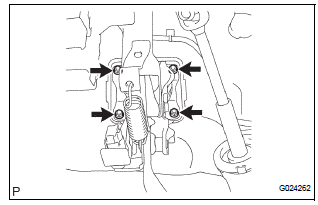
(c) Remove the 4 nuts and clevis.
(d) Pull out the brake booster with master cylinder.
15. REMOVE BRAKE BOOSTER GASKET
(a) Remove the brake booster gasket from the brake booster with master cylinder.
16. REMOVE BRAKE VACUUM CHECK VALVE ASSEMBLY
(a) Remove the brake vacuum check valve assembly and check valve grommet from the brake booster assembly.
 On-vehicle inspection
1. INSPECT BRAKE BOOSTER
(a) Air tightness check.
(1) Start the engine and stop it after 1 or 2 minutes.
Depress the brake pedal several times slowly.
HINT:
If the pedal goes down farthes ...
 Inspection
1. INSPECT BRAKE VACUUM CHECK VALVE ASSEMBLY
(a) Check the vacuum check valve.
(1) Slide the clip and disconnect the vacuum hose.
(2) Remove the vacuum check valve.
(3) Check that there ...
Other materials:
On-vehicle inspection
1. INSPECT DRIVE BELT
(a) Visually check the drive belt for excessive wear,
frayed cords, etc.
If any defect is found, replace the drive belt.
HINT:
Cracks on the rib side of a belt are considered
acceptable. Replace the belt if there are any
missing ribs.
2. CHECK POWER STEERING FLUID ...
Removal
1. DISCONNECT CABLE FROM NEGATIVE BATTERY
TERMINAL
2. DRAIN ENGINE COOLANT
3. REMOVE FRONT WIPER ARM HEAD CAP (See page
WW-4)
4. REMOVE FRONT WIPER ARM RH (See page WW-4)
5. REMOVE FRONT WIPER ARM LH (See page WW-4)
6. REMOVE COWL TOP VENTILATOR LOUVER SUBASSEMBLY
(See page WW-4)
7. REMOVE ...
Evaporative Emission System Switching Valve Control Circuit High
DTC SUMMARY
DESCRIPTION
The circuit description can be found in the EVAP (Evaporative Emission)
System (See page ES-404).
INSPECTION PROCEDURE
Refer to the EVAP System (See page ES-404).
MONITOR DESCRIPTION
5 hours*1 after the ignition switch is turned off, the electric vacuum pump
...
