
Toyota Sienna Service Manual: Removal
HINT: Remove the RH side by the same procedure as the LH side.
1. REMOVE REAR WHEEL
2. DRAIN BRAKE FLUID
NOTICE: Wash the brake fluid off immediately if it attaches to any painted surface.
3. SEPARATE REAR BRAKE TUBE NO.4
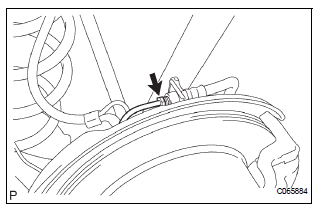
(a) Remove the clip and a disconnect, the rear brake flexible hose.
(b) Using SST and spanner loosen the rear brake tube No. 4.
SST 09023-00101
4. SEPARATE REAR LH FLEXIBLE HOSE
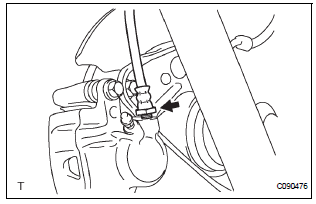
(a) Using SST, remove the rear brake flexible hose.
SST 09023-12701
5. REMOVE DISC BRAKE CYLINDER ASSEMBLY REAR LH
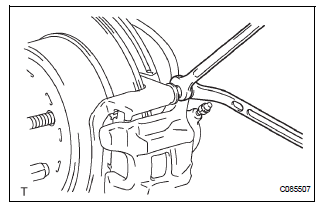
(a) Hold the rear disc brake cylinder slide pin and remove the 2 bolts.
(b) Remove the disc brake cylinder assembly rear LH from the rear disc brake cylinder mounting LH.
6. REMOVE REAR DISC BRAKE CYLINDER SLIDE PIN
(a) Remove the 2 rear disc brake cylinder slide pins from the rear disc brake cylinder mounting LH.
7. REMOVE REAR DISC BRAKE BUSH DUST BOOT
(a) Remove the 2 rear disc brake bush dust boots.
8. REMOVE DISC BRAKE PAD KIT REAR (PAD ONLY)
(a) Remove the disc brake pad kit rear.
9. REMOVE REAR DISC BRAKE ANTI SQUEAL SHIM KIT
(a) Remove the anti squeal shim No. 1 and anti squeal shim No. 2 from each pad.
10. REMOVE REAR DISC BRAKE PAD SUPPORT PLATE
(a) Remove the rear disc brake pad support plate (No.
1) and rear disc brake pad support plate (No. 2) from the rear disc brake cylinder mounting LH.
11. REMOVE REAR DISC BRAKE CYLINDER MOUNTING LH
(a) Remove the bolts and rear disc brake cylinder mounting LH.
 Rear disc brake
COMPONENTS
...
 Disassembly
1. REMOVE CYLINDER BOOT
(a) Using a screwdriver, remove the set ring and
cylinder boot.
2. REMOVE REAR DISC BRAKE PISTON
(a) Place a shop rug, between the rear disc brake
piston and the disc ...
Other materials:
Cruise Main Indicator Light Circuit
DESCRIPTION
When the cruise control main switch is on, the CRUISE main indicator light
and READY indicator light
come on. This indicates the control condition (presence or absence of a vehicle
in front, vehicle-to-vehicle
distance, and set vehicle speed) and fail-safe state through the multip ...
Speaking on the phone
The following screen is displayed when speaking on the phone.
To adjust the call volume
Select “-� or “+�. You can also adjust the volume using the steering
switches or the volume knob.
To prevent the other party from hearing your voice
Select “Mute�.
Inputting tones
When usin ...
Rear Occupant Classification Sensor LH Collision
Detection
DTC B1787 Rear Occupant Classification Sensor LH Collision
Detection
DESCRIPTION
DTC B1787 is output when the occupant classification ECU receives a collision
detection signal sent by
the rear occupant classification sensor LH if an accident occurs.
DTC B1787 is also output when the front s ...
