
Toyota Sienna Service Manual: Rear disc brake
COMPONENTS
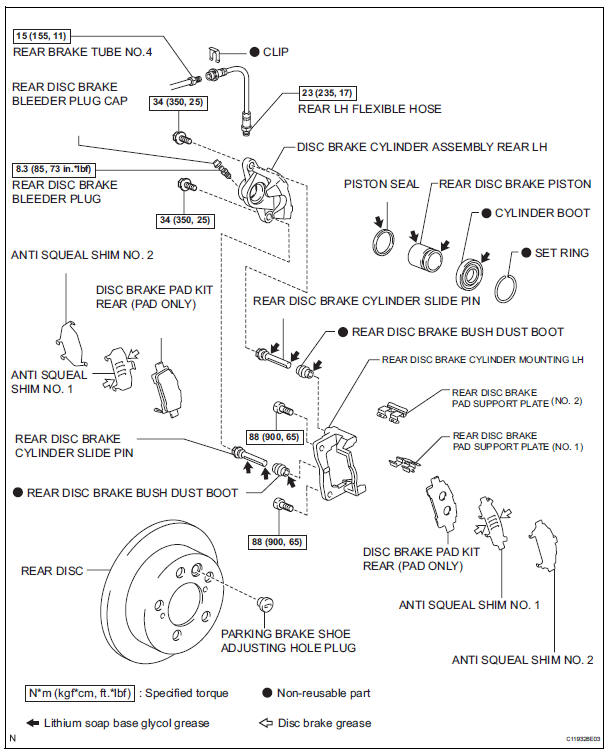
 Installation
HINT:
Install the RH side by the same procedure as the LH side.
1. INSTALL FRONT DISC BRAKE CYLINDER SLIDE BUSH
(a) Apply the lithium soap base glycol grease to a new
front disc brake cylinder ...
 Removal
HINT:
Remove the RH side by the same procedure as the LH side.
1. REMOVE REAR WHEEL
2. DRAIN BRAKE FLUID
NOTICE:
Wash the brake fluid off immediately if it attaches to
any painted surface.
3. S ...
Other materials:
Communication Error from ECM to Distance
Control ECU
DTC P1616 Communication Error from ECM to Distance
Control ECU
DTC U0100 Lost Communication with ECM/PCM "A"
DESCRIPTION
The ECM receives signals from each sensor and ECU, then sends signals such as
A/T signals, cruise
control operation signals, low speed operation signals, brake co ...
Sound Signal Circuit between Radio and Navigation Assembly and
Television Display Assembly
DESCRIPTION
The television display assembly sends an RSE sound signal to the radio and
navigation assembly through
this circuit. The sound signal that has been sent is amplified by the stereo
component amplifier, and then
is sent to the speakers.
If there is an open or short in the circuit ...
Front Fog Light Circuit
DESCRIPTION
The Multiplex network body ECU controls FOG relay when signal is received
from headlight dimmer
switch assembly.
WIRING DIAGRAM
INSPECTION PROCEDURE
1 PERFORM ACTIVE TEST BY INTELLIGENT TESTER
Connect the intelligent tester to DLC3.
Turn the ignition switch ON and push t ...
