
Toyota Sienna Service Manual: Removal
1. REMOVE INSTRUMENT CLUSTER NO.1 FINISH PANEL CENTER
2. REMOVE INSTRUMENT CLUSTER NO.2 FINISH PANEL CENTER
3. REMOVE INSTRUMENT CLUSTER FINISH PANEL GARNISH
4. REMOVE NAVIGATION RECEIVER ASSEMBLY WITH BRACKET
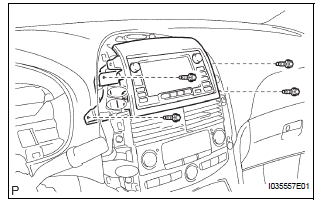
- Remove the 4 screws.
- Disconnect the connector and remove the navigation receiver assembly with bracket.
5. REMOVE INSTRUMENT CLUSTER FINISH PANEL UPPER
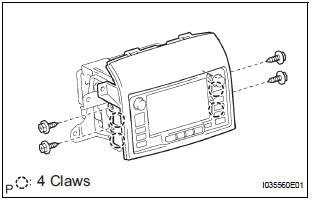
- Remove the 4 screws and the instrument cluster finish panel upper.
6. REMOVE NO.1 NAVIGATION BRACKET
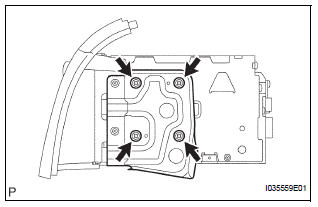
- Remove the 4 screws and the No.1 navigation bracket.
7. REMOVE NO.2 NAVIGATION BRACKET
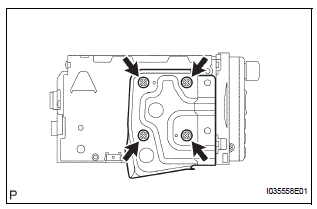
- Remove the 4 screws and the No.2 navigation bracket from the navigation receiver assembly.
 Navigation receiver
COMPONENTS
...
 Installation
1. INSTALL NO.1 NAVIGATION BRACKET
Install the No.1 navigation bracket with the 4
screws.
2. INSTALL NO.2 NAVIGATION BRACKET
Install the No.2 navigation bracket with t ...
Other materials:
Side Airbag Sensor Assembly RH Circuit Malfunction
DTC B1140/32 Side Airbag Sensor Assembly RH Circuit Malfunction
DESCRIPTION
The side airbag sensor RH circuit consists of the center airbag sensor
assembly and side airbag sensor
RH.
If the center airbag sensor assembly receives signals from the side airbag
sensor RH, it judges whether or
...
For vehicles equipped with srs airbag and seat belt pretensioner
The SIENNA is equipped with a Supplemental Restraint System (SRS).
CAUTION: Failure to carry out the service operations in the correct sequence could cause the SRS to unexpectedly deploy during servicing and lead to serious injury. Furthermore, if a mistake is made when servicing SRS, it is poss ...
Installation
1. INSTALL HIGH MOUNTED STOP LIGHT ASSEMBLY
2. INSTALL REAR SPOILER
Install the rear spoiler with the 3 nuts and 2 clips.
Connect the center stop light connector.
3. INSTALL BACK DOOR CENTER GARNISH
Engage the 5 clips to install the back door center
garnish.
...
