
Toyota Sienna Service Manual: Removal
HINT: On the RH side, use the same procedures as on the LH side.
1. REMOVE BACK DOOR STAY SUB-ASSEMBLY LH
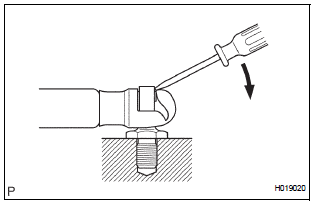
- Remove the 2 bolts and disconnect the stay from the body panel.
- Using the screwdriver, disengage the clips and remove the stay from the door panel.
- Remove the bolt from door panel.
 Back door support
COMPONENTS
...
 Installation
1. REMOVE BACK DOOR STAY SUB-ASSEMBLY LH
Install the stay with the bolts to the door panel.
Torque: 19.5 N*m (200 kgf*cm, 14 ft.*lbf) for
door side
Install the stay with the 2 bolts to the b ...
Other materials:
Installation with LATCH system (third seat)
Manual seat
Fold the seatback while pulling
the strap. Return the seatback
and secure it at the 1st lock
position (most upright position).
Adjust the seatback to the
11th lock position.
1st lock position
11th lock position
Power seat
Fold down the seatb ...
Battery
Check the battery as follows:
Battery exterior
Make sure that the battery terminals are not corroded and that
there are no loose connections, cracks, or loose clamps.
Terminals
Hold-down clamp
Before recharging
When recharging, the battery produces hydrogen gas which is flammable an ...
Power Window cannot be Operated by Wireless Operation
DESCRIPTION
When the switch on the transmitter is operated during normal operating
conditions, the
multiplex network body ECU sends a request signal to the master switch and the
regulator switches which
then drive the applicable power window motors.
INSPECTION PROCEDURE
1 CHECK WIRELESS DOO ...
