
Toyota Sienna Service Manual: Removal
1. DISCONNECT CABLE FROM NEGATIVE BATTERY TERMINAL
2. REMOVE V-BANK COVER SUB-ASSEMBLY (See page EM-28)
3. REMOVE PURGE VSV
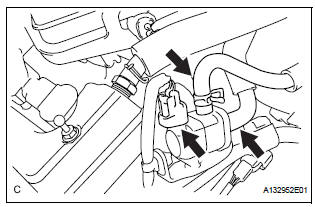
(a) Disconnect the purge VSV connector.
(b) Disconnect the 2 purge line hoses from the purge VSV.
(c) Remove the purge VSV from the air cleaner hose.
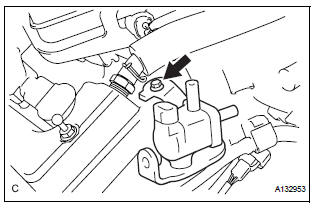
(d) Remove the bolt and No. 1 vacuum switching valve.
 Vacuum switching valve
Components
...
 Inspection
1. INSPECT PURGE VSV
(a) Measure the resistance of the purge VSV.
Standard resistance
If the result is not as specified, replace the purge
VSV.
(b) Check the operation of the purge VSV. ...
Other materials:
Initialization procedure
(a) Make sure that the ignition switch is off.
(b) Connect the intelligent tester to the DLC3.
(c) Turn the ignition switch to the ON position.
(d) Select "TIREPRESS" by following the prompts
displayed on the intelligent tester.
(e) Press the tire pressure warning reset sw ...
Disassembly
1. INSPECT PACK CLEARANCE OF REVERSE CLUTCH
HINT:
(See page AX-249)
2. INSPECT PACK CLEARANCE OF DIRECT CLUTCH
AND OVERDRIVE CLUTCH
HINT:
(See page AX-249)
3. REMOVE DIRECT MULTIPLE DISC CLUTCH DISC
(a) Using a screwdriver, remove the snap ring from the
intermediate shaft.
(b) Remo ...
Short to B+ in Curtain Shield Squib LH Circuit
DTC B1168/86 Short to B+ in Curtain Shield Squib LH Circuit
DESCRIPTION
The curtain shield squib LH circuit consists of the center airbag sensor
assembly and the curtain shield
airbag assembly LH.
The circuit instructs the SRS to deploy when deployment conditions are met.
DTC B1168/86 is ...
