
Toyota Sienna Service Manual: Removal
1. REMOVE ENGINE ASSEMBLY WITH TRANSAXLE
HINT: See page EM-26
2. SECURE ENGINE (See page EM-37) 3. REMOVE GENERATOR ASSEMBLY (See page CH-17) 4. REMOVE COMPRESSOR AND MAGNETIC CLUTCH (See page AC-227) 5. REMOVE NO. 1 ENGINE FRONT MOUNTING BRACKET LH (See page EM-42) 6. REMOVE NO. 2 IDLER PULLEY SUB-ASSEMBLY
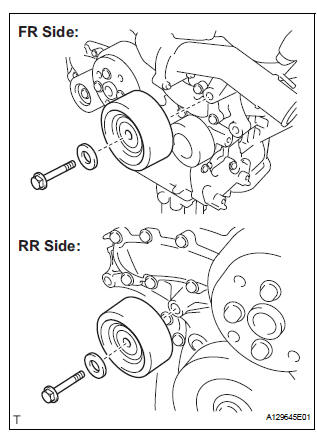
(a) Remove the 2 bolts, 2 idler pulley cover plates and 2 idler pulley sub-assemblies.
7. REMOVE V-RIBBED BELT TENSIONER ASSEMBLY
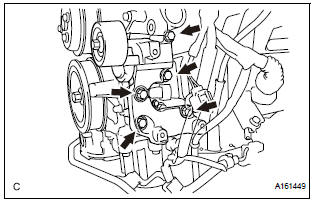
(a) Remove the 5 bolts and V-ribbed belt tensioner assembly.
8. REMOVE WATER PUMP PULLEY
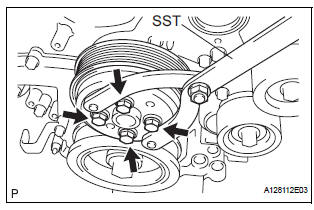
(a) Using SST, hold the water pump pulley.
SST 09960-10010 (09962-01000, 09963-00700) (b) Remove the 4 bolts and water pump pulley.
9. REMOVE WATER INLET HOUSING
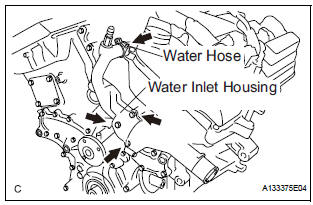
(a) Disconnect the water hose.
(b) Remove the 2 bolts, nut and water inlet housing.
(c) Remove the water inlet housing gasket and water outlet pipe O-ring.
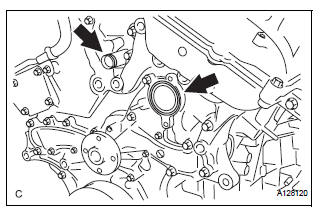
10. REMOVE WATER PUMP ASSEMBLY
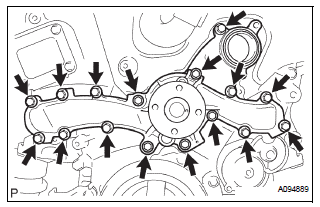
(a) Remove the 16 bolts, water pump assembly and water pump gasket.
 Water pump
COMPONENTS
...
 Inspection
1. Inspect water pump assembly
(a) Visually check the drain hole and air hole for coolant
leakage.
(b) Turn the pulley, and check that the water pump
bearing moves smoothly and noiselessly.
...
Other materials:
Circuit opening relay
Inspection
1. INSPECT CIRCUIT OPENING RELAY
Using an ohmmeter, measure the resistance
according to the value(s) in the table below.
Standard resistance
If the result is not as specified, replace the relay. ...
If you have a flat tire
(vehicles with
run-flat tires)
Your vehicle is not equipped with a spare tire, but instead you
can continue driving the vehicle with run-flat tires even if any
tire goes flat.
In this case, slow down and drive with extra caution.
Run-flat tires (A “RFT� or “DSST� mark is molded on the sidewall)
Take your vehicle to ...
Under hood
GENERAL MAINTENANCE
1. GENERAL NOTES
Maintenance requirements very depending on the
country.
Check the maintenance schedule in the owner's
manual supplement.
Following the maintenance schedule is mandatory.
Determine the appropriate time to service the vehicle
using either miles dri ...
