
Toyota Sienna Service Manual: Security Horn Circuit
DESCRIPTION
During the alarm sounding state, the relay in the ECU turns on and off in a cycle of approximately 0.2 seconds, causing the security horn to sound.
WIRING DIAGRAM
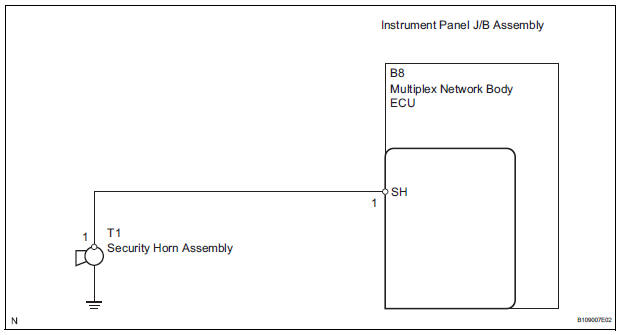
INSPECTION PROCEDURE
1 INSPECT SECURITY HORN ASSEMBLY
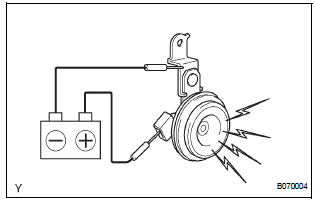
- Disconnect the T1 security horn connector.
- Check the operation of the security horn.
Standard

2 CHECK HARNESS AND CONNECTOR (MULTIPLEX NETWORK BODY ECU - SECURITY HORN ASSEMBLY)
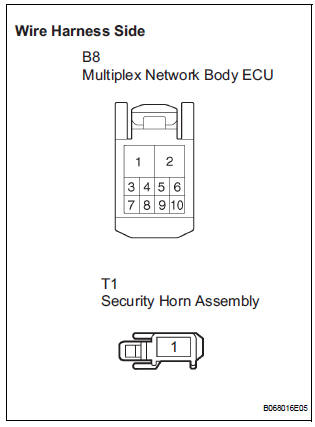
- Disconnect the B8 ECU connector.
- Measure the resistance according to the value(s) in the table below.
Standard resistance

REPLACE MULTIPLEX NETWORK BODY ECU
 Engine Hood Courtesy Switch Circuit
DESCRIPTION
The engine hood courtesy switch is built in the engine hood lock assembly.
The switch turns on when the
engine hood is opened and turns off when the engine hood is closed.
WIRING DIAG ...
 Ignition Switch Circuit
DESCRIPTION
When the ignition switch is turned to the ON position, battery positive
voltage is applied to terminal IG of
the ECU. When battery positive voltage is applied to terminal IG of the ECU ...
Other materials:
Open in Rear Curtain Shield Squib LH Circuit
DTC B1636/88 Open in Rear Curtain Shield Squib LH Circuit
DESCRIPTION
The rear curtain shield squib LH circuit consists of the center airbag sensor
assembly and the curtain
shield airbag assembly LH.
The circuit instructs the SRS to deploy when deployment conditions are met.
DTC B1636/88 ...
Park / Neutral Position Switch Circuit
DESCRIPTION
The clearance warning ECU receives the reverse or park position signal from
the park / neutral position
switch.
WIRING DIAGRAM
INSPECTION PROCEDURE
1 INSPECT CLEARANCE WARNING ECU
Disconnect the C9 connector from the clearance warning
ECU.
Measure the voltage ...
Installation
1. INSTALL TRANSFER ASSEMBLY
(a) Apply sealant 1281 to the transaxle assembly and
transfer assembly in continuous beaded from of 1.2
mm diameter as shown in the illustration.
NOTICE:
Wipe any grease off from the attaching
surfaces.
Install it within 10 minutes after applying the
se ...
