
Toyota Sienna Service Manual: System description
1. MULTIPLEX COMMUNICATION SYSTEM (BEAN)
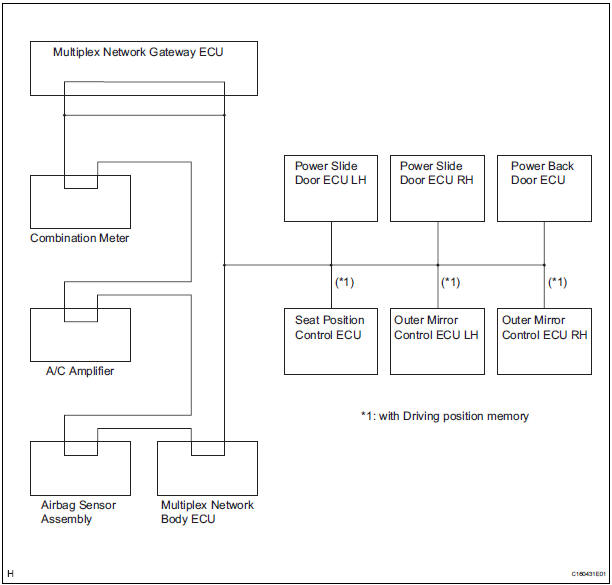
- The BEAN communication line is used to control the combination meter, the A/C amplifier, the airbag sensor assembly, the multiplex network body ECU, the power slide door ECU LH, the power slide door ECU RH, the power back door ECU, the seat position control ECU, the outer mirror control ECU LH, and the outer mirror ECU RH. If there is a shortcircuit (bus-down) in the line, the communication to the system that has a short-circuit (bus-down) will be disabled and the DTC concerning the system will be output from the multiplex network gateway ECU.
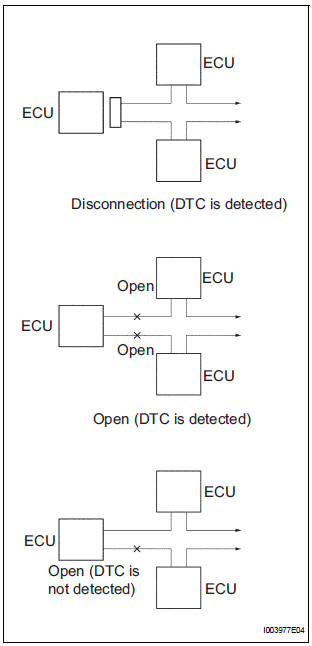
- If the DTC of ECU communication stop is output, connectors may be disconnected, or communication buses may be open at 2 points. It will not become abnormal with only 1 communication bus open.
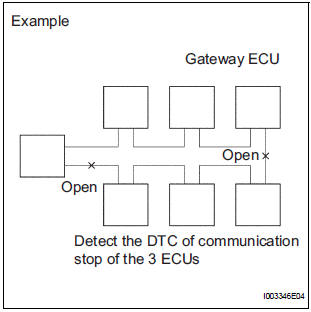
- If 2 communication buses are open at the points shown in the illustration, the DTC of ECU communication stop between those 2 buses is output.
2. CHECK COMMUNICATION FUNCTION
- Check the battery voltage.
Standard voltage: 11 to 14 V
- Inspect the DTC output.
- Check a DTC concerning the multiplex network body ECU by connecting the intelligent tester to the DLC3 and turning the ignition switch to the ON position.
- When the display shows DTCs concerning the ECU unconnected and the communication bus defective, perform the inspection depending on the troubleshooting procedures.
HINT: When another DTC is output, refer to the DTC table and check the applicable section.
 Multiplex communication system
PARTS LOCATION
...
 How to proceed with
troubleshooting
How to proceed with
troubleshooting
HINT:
Troubleshoot in accordance with the procedures on the
following pages.
1 VEHICLE BROUGHT TO WORKSHOP
2 DTC CHECK
Check for DTCs and make a note of the code that is
output (See page MP- ...
Other materials:
For vehicles equipped with mobile communication systems
FOR VEHICLES EQUIPPED WITH MOBILE COMMUNICATION SYSTEMS
(a) Install the antenna far away from the ECU and
sensors of the vehicle electronic systems as
possible.
(b) Install an antenna feeder at least 20 cm (7.87 in.)
away from the ECU and sensors of the vehicle
electronic systems. For de ...
Poor Sound Quality in All Modes (Low Volume)
INSPECTION PROCEDURE
1 CHECK AUDIO SETTINGS
Set "BASS", "MID", and "TREB" to the initial values and
check that sound is normal.
OK:
Malfunction disappears.
2 COMPARE WITH ANOTHER VEHICLE OF SAME MODEL
Compare with another vehicle of the same model.
...
Charge Warning Light Comes ON while Driving
INSPECTION PROCEDURE
1 CHECK LOCK FUNCTION OF CLUTCH PULLEY
(a) Check the lock function with the pulley installed in the
vehicle.
(1) Visually check that the rotor in the generator
operates with the engine started.
(b) Check the lock function with the pulley removed from the
vehicle.
( ...
