
Toyota Sienna Service Manual: Terminals of ECU
1. TELEVISION CAMERA ASSEMBLY
- Disconnect the T10 camera connector
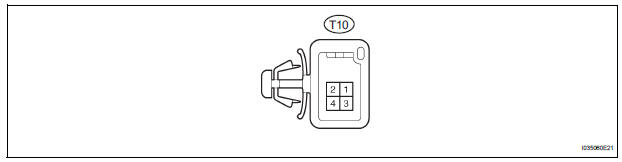
- Measure the voltage and resistance of each terminal of the wire harness side connector.

If the result is not as specified, there may be a malfunction on the wire harness side.
- Reconnect the T10 camera connector.
- Measure the voltage and frequency of each terminal of the connector.

If the result is not as specified, the camera may have a malfunction.
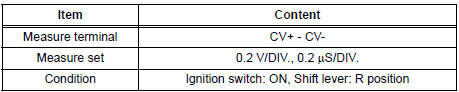
- Reference: Oscilloscope waveform
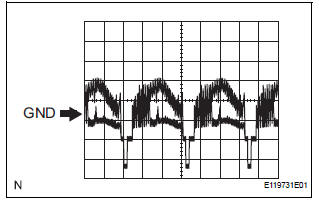
- Waveform 1
2. RADIO AND NAVIGATION ASSEMBLY
- Reverse Signal Circuit
- Display Signal Circuit between Radio and Navigation Assembly and Television Camera Assembly
 Problem symptoms table
Before inspecting the suspected areas listed in the table
below, check the fuse and relay.
Before inspecting the suspected areas listed in the table
below, check the DTCs.
Metho ...
 Reverse Signal Circuit
DESCRIPTION
The radio and navigation assembly receives a reverse signal from the
park/neutral position switch.
WIRING DIAGRAM
INSPECTION PROCEDURE
1 INSPECT RADIO AND NAVIGATION ASSEMBLY
...
Other materials:
Player Error
DTC 58-44 Player Error
DTC 80-44 Player Error
DESCRIPTION
DTC No.
DTC Detection Condition
Trouble Area
58-44
Map player error is detected
Radio and navigation assembly
80-44
Map player error is detected.
INSPECTION PROCEDURE
HINT: ...
Removal
1. Remove no. 2 Air cleaner inlet (see page em-
28)
2. Remove air cleaner cap sub-assembly
(a) Disconnect the 3 vacuum hoses.
(b) Loosen the bolt, disconnect the 2 connectors, and
remove the 2 vacuum hoses.
(c) Remove the 2 bolts, air cleaner cap sub-assembly,
and air cleaner filt ...
How to proceed with
troubleshooting
HINT:
Troubleshoot in accordance with the procedures on the
following pages
1 VEHICLE BROUGHT TO WORKSHOP
2 CUSTOMER PROBLEM ANALYSIS CHECK AND SYMPTOM CHECK
3 INSPECT COMMUNICATION FUNCTION OF LARGE-SCALE MULTIPLEX
COMMUNICATION SYSTEM (BEAN)
Use the intelligent tester to check for normal ...
