
Toyota Sienna Service Manual: Transfer system
PRECAUTION
NOTICE:
1. Before disassembly, clean the transfer assembly of any sand or mud to prevent it from entering inside the transfer during disassembly and assembly.
2. When removing any light alloy part such as a transfer cover, do not pry it off with a tool like a screwdriver, but tap it out with a plastic hammer instead.
3. Always arrange the removed parts properly and protect them from dust.
4. Before installation, clean and dry all parts completely, and then apply hypoid gear oil to each part. Do not use alkaline chemicals when cleaning aluminum, rubber parts, or ring gear set bolts. Also do not use any cleaning oil (ex. white gasoline) to clean the rubber parts such as O-rings and oil seals.
5. Apply hypoid gear oil to any sliding surface or rotating part.
6. Do not directly hold a part in a vise. Make sure to put an aluminum sheet between them.
7. Replace any damaged or deformed snap ring with a new one.
8. If there is a scratch on the contact surface of the case, it may cause oil leakage. Therefore, be careful not to to damage the contact surface when handling it.
9. Before applying a sealant, completely remove any old sealant stuck on the parts and clean with white gasoline.
10.Do not add oil immediately after installing sealed parts. Leave for 1 hour or more 11.Scratches on a contact surface of an oil seal, O-ring or gasket may cause oil leakage. Be careful not to damage the contact surface when handling the seals.
12.When press-fitting an oil seal, be careful not to damage the oil seal lip and around it.
13.When replacing a bearing, replace the inner and outer races as a set.
PROBLEM SYMPTOMS TABLE
Transfer system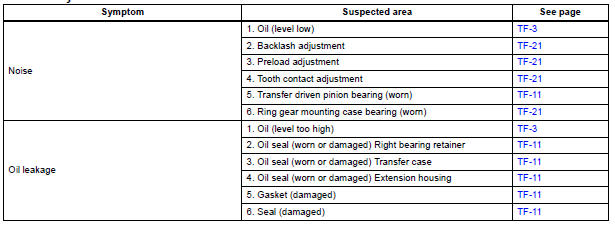
 Transfer
...
 Transfer oil
ON-VEHICLE INSPECTION
1. INSPECT TRANSFER OIL
(a) Remove the No. 1 plug and gasket.
(b) Check the oil level is within 0 - 5 mm (0 - 0.20 in.)
below the lowest end of the hole for No. 1 plug. ...
Other materials:
Removal
1. REMOVE REAR SEAT 3 POINT TYPE BELT
ASSEMBLY (for 8-Passenger)
HINT:
Refer to the instructions for disassembly of the rear No. 1 seat assembly (for
center seat).
Remove the bolt and rear seat 3 point type belt
assembly.
2. REMOVE REAR SEAT 3 POINT TYPE BELT
ASSEMBLY (for 7-Pas ...
Installation
HINT:
Install the RH side by the same procedure as the LH side.
1. INSTALL REAR SPEED SENSOR
(a) Clean the contacting surface of the axle hub and a
new skid control sensor.
NOTICE:
Keep the sensor rotor clean.
(b) Place the speed sensor on the axle hub so that the
connector is positioned ...
Fuel pump resistor
Components
REMOVAL
1. REMOVE FUEL PUMP RESISTOR
(a) Disconnect the connector.
(b) Remove the nut and fuel pump resistor.
INSPECTION
1. INSPECT FUEL PUMP RESISTOR
(a) Inspect fuel pump resistor.
(1) Using an ohmmeter, measure the resistance
between the terminals.
Standard resi ...
