
Toyota Sienna Service Manual: Cursor or Map Rotates when Vehicle Stopped
INSPECTION PROCEDURE
1 CHECK CONDITION
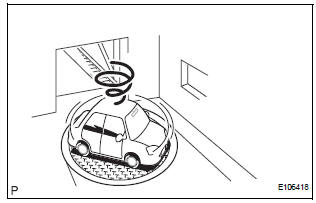
- Check with the customer if the vehicle has been turned by a turntable.
OK: Vehicle has not been turned by turntable.
HINT: If the vehicle is turned on a turntable with the ignition switch on, the system may store the angular velocity. As a result, the vehicle position cursor may deviate.
PROCEED TO NEXT CIRCUIT INSPECTION SHOWN IN PROBLEM SYMPTOMS TABLE
 Vehicle Position Mark Deviates Greatly
INSPECTION PROCEDURE
1 CHECK GPS MARK
Check that the GPS mark is displayed.
OK:
GPS mark is displayed
2 CHECK VEHICLE SENSOR (NAVIGATION CHECK MODE)
Enter the "Navigation Ch ...
 Vehicle Position Mark is not Updated
INSPECTION PROCEDURE
1 CHECK MAP DISC
Check that the map disc is not deformed or cracked.
OK:
No deformations or cracks on map disc.
2 CHECK MAP DISPLAY
Check if a touch scroll can b ...
Other materials:
SRS airbags
The SRS airbags inflate when the vehicle is subjected to certain
types of severe impacts that may cause significant injury to the
occupants. They work together with the seat belts to help reduce
the risk of death or serious injury.
SRS front airbags
SRS driver airbag/front passenger ...
Vanity light
ON-VEHICLE INSPECTION
1. LH VISOR ASSEMBLY
Inspect vanity light resistance.
check that the resistance exists between the
terminal 1 and the terminal 2 when the light is
operated.
Resistance:
OFF (closed):
10 kΩ or higher
ON (opened):
Below 1 Ω
2. RH VISOR ...
Video terminal
COMPONENTS
REMOVAL
1. REMOVE REAR DOOR SCUFF PLATE LH
2. REMOVE REAR DOOR WEATHERSTRIP LH
3. REMOVE BACK DOOR WEATHERSTRIP
4. REMOVE BACK DOOR SCUFF PLATE
5. REMOVE QUARTER TRIM FRONT PANEL ASSEMBLY LH
6. REMOVE VIDEO(VIDEO ADAPTER) TERMINAL
Release the 4 claw fittings and ...
