
Toyota Sienna Service Manual: Vehicle Position Mark is not Updated
INSPECTION PROCEDURE
1 CHECK MAP DISC
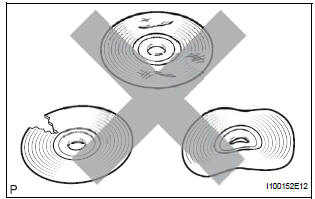
- Check that the map disc is not deformed or cracked.
OK: No deformations or cracks on map disc.
2 CHECK MAP DISPLAY
- Check if a touch scroll can be performed on the map display.
OK: Touch scroll can be performed
3 CHECK VEHICLE SENSOR (NAVIGATION CHECK MODE)
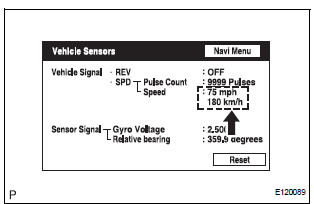
- Enter the "Navigation Check" mode (Vehicle Sensors).
- While driving the vehicle, compare the "Speed" indicator to the reading on the speedometer. Check if these readings are almost equal.
OK: The readings are almost equal.
PROCEED TO NEXT CIRCUIT INSPECTION SHOWN IN PROBLEM SYMPTOMS TABLE
 Cursor or Map Rotates when Vehicle Stopped
INSPECTION PROCEDURE
1 CHECK CONDITION
Check with the customer if the vehicle has been turned
by a turntable.
OK:
Vehicle has not been turned by turntable.
HINT:
If the vehicle is t ...
 Current Position Display does not Appear
INSPECTION PROCEDURE
1 CHECK RADIO AND NAVIGATION ASSEMBLY
Check if a map disc is inserted into the map disc slot.
OK:
A map disc is inserted
2 CHECK MAP DISC
Check that the map ...
Other materials:
Wrong Disc/ Disc cannot be Read
DTC 63-41 Wrong Disc
DTC 63-42 Disc cannot be Read
DESCRIPTION
DTC No.
DTC Detection Condition
Trouble Area
63-41
An unsuitable disc is inserted
CD
Radio and navigation assembly
63-42
The disc cannot be read
INSP ...
Installation
1. INSTALL NO. 2 REAR SEAT OUTER BELT ASSEMBLY
NOTICE:
Do not disassemble the retractor.
Check the degree of tilt when the No. 2 rear seat
outer belt assembly begins to lock the ELR.
Check that the belt does not lock within 15 of
tilt in all directions but that the be ...
Inspection
1. INSPECT INVERTER MAIN SWITCH
Inspect the continuity between terminal at the each
switch position shown in the chart.
If continuity is not as specified, replace the main
switch assembly.
Inspect the bulb state when connecting the battery
to each terminal
...
