
Toyota Sienna Service Manual: Data list / active test
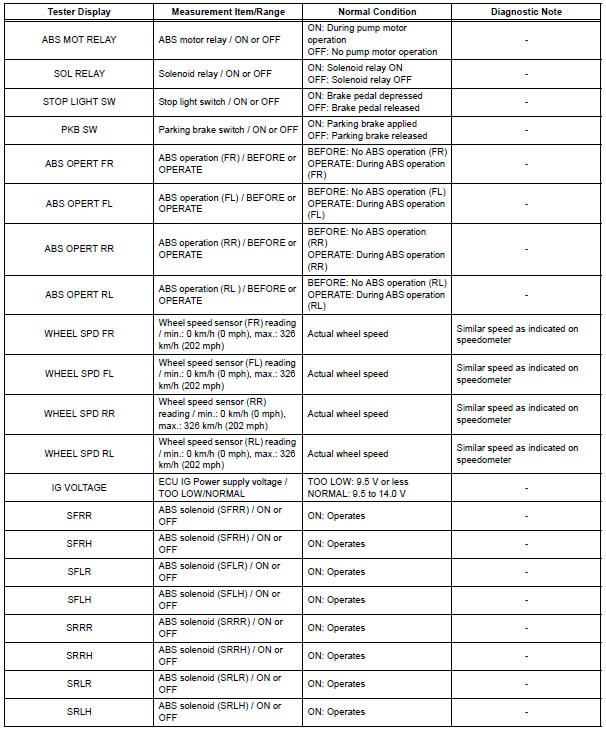
1. DATA LIST
(a) While the intelligent tester is connected to the DLC3 with the ignition switch in the ON position, the ABS data list can be displayed. Follow the prompts on the tester screen to access the DATA LIST.

2. ACTIVE TEST
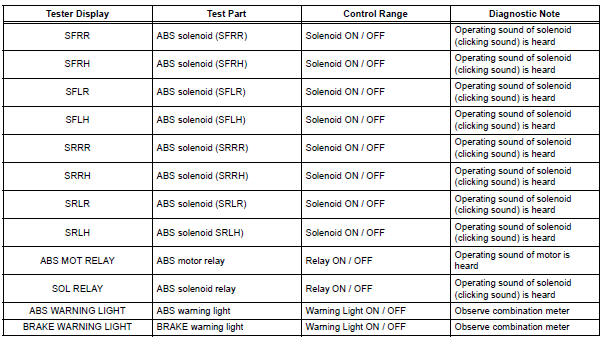
HINT: Performing the ACTIVE TEST using the intelligent tester allows the relay, actuator, etc. to operate without removing any parts. Performing the ACTIVE TEST as the first step of troubleshooting is one of the methods to shorten labor time.
It is possible to display the DATA LIST during the ACTIVE TEST.
(a) Connect the intelligent tester to the DLC3.
(b) Turn the ignition switch to the ON position.
(c) According to the display on the tester, perform the ACTIVE TEST.
HINT: The ignition switch must be turned to the ON position to proceed to the ACTIVE TEST using the intelligent tester.
 Freeze frame data
1. FREEZE FRAME DATA
(a) Whenever a DTC is detected or the ABS operates,
the skid control ECU stores the current vehicle
(sensor) state as freeze frame data.
The skid control ECU stores the numb ...
 Diagnostic trouble code chart
HINT:
If a trouble code is displayed during the DTC check, check
the circuit indicated by the DTC. For details of each code,
turn to the page for the respective DTC Code. in the DTC
chart.
...
Other materials:
Illumination Circuit
DESCRIPTION
The Multiplex network body ECU controls illumination light as shown in the
chart below.
Room light assembly (Interior light, luggage component light) and
courtesy light with DOOR position
Map light assembly (Personal light)
Transponder key amplifier (Ignition ke ...
Indicators
The indicators inform the driver of the operating state of the vehicle’s
various systems.
*1: If equipped
*2: These lights turn on when the engine switch is turned to the “ON� position
(vehicles without a smart key system) or IGNITION ON mode (vehicles
with a smart key system) to ...
Diagnosis system
1. CHECK DLC3
The ECU uses the ISO 15765-4 for communication
protocol. The terminal arrangement of the DLC3
complies with SAE J1962 and matches the ISO
15765-4 format.
NOTICE:
*: Before measuring the resistance, leave the
vehicle as is for at least 1 minute and do not
ope ...
