
Toyota Sienna Service Manual: Disassembly
1. REMOVE RH SEAT REAR SEAT RECLINING COVER
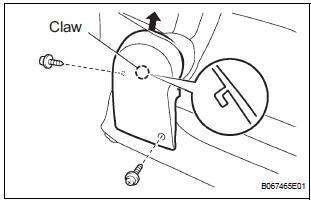
- Remove the 2 screws.
- Remove the RH seat rear seat reclining cover by pulling it out in the arrow mark direction shown in the illustration.
2. REMOVE LH SEAT REAR SEAT RECLINING COVER
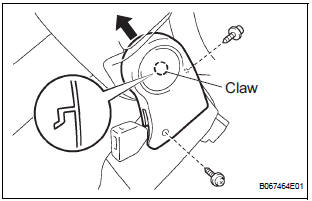
- Remove the 2 screws.
- Remove the LH seat rear seat reclining cover by pulling it out in the arrow mark direction shown in the illustration.
3. REMOVE REAR SEATBACK ASSEMBLY RH
- Disengage the reclining remote control cable.
- Disengage the rear seat lock release strap cable.
- Remove the 4 bolts and rear seatback assembly RH.
4. REMOVE REAR NO. 2 SEAT BELT ASSEMBLY INNER RH
- Remove the bolt and rear No.2 seat belt assembly inner RH.
5. REMOVE NO. 2 REAR SEAT COVER BEZEL
- Remove the 3 screws and No. 2 rear seat cover bezel.
6. REMOVE NO. 2 SEATBACK LOCK CONTROL BEZEL
- Remove the screw and No. 2 seatback lock control bezel.
7. REMOVE NO. 2 SEATBACK COVER RH
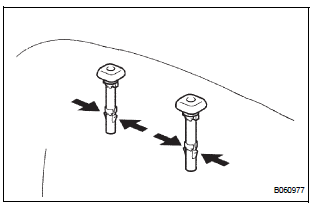
- Disengage the claw and remove the 2 headrest supports.
- Remove the hog rings and seatback cover together with the pad.
- Remove the hog rings and No. 2 seatback cover RH.
8. REMOVE REAR SEAT LOCK RELEASE STRAP ASSEMBLY
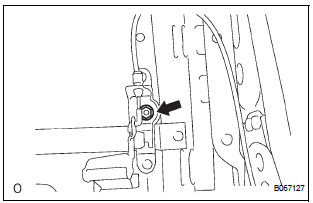
- Remove the nut and rear seat lock release strap assembly.
9. REMOVE REAR SEAT BACK CONNECTING RH WIRE
- Remove the nut and rear seatback connecting RH wire.
10. REMOVE RECLINING RELEASE HANDLE SUBASSEMBLY RH
- Remove the screw and reclining release handle sub-assembly RH.
11. REMOVE RECLINING ADJUSTER RELEASE HANDLE NO. 2 RH
- Remove the nut and reclining adjuster release handle No.2 RH.
12. REMOVE NO. 2 SEAT CUSHION COVER SUBASSEMBLY RH
- Remove the hog rings and cushion cover together with the pad.
- Remove the hog rings and No. 2 seat cushion cover sub-assembly RH.
13. REMOVE LOCUS CABLE RH
- Remove the nut and locus cable RH.
14. REMOVE NO. 2 SEAT CUSHION SPRING ASSEMBLY RH
15. REMOVE REAR SEAT STAY SUB-ASSEMBLY
- Remove the nut and seat stay sub-assembly.
 Removal
1. REMOVE REAR SEAT LEG SIDE GARNISH SUBASSEMBLY RH
Disengage the clips and remove the seat leg side
garnish sub-assembly RH.
2. REMOVE REAR NO. 2 SEAT ASSEMBLY RH
Remove ...
 Reassembly
1. INSTALL REAR SEAT STAY SUB-ASSEMBLY
Install the seat stay sub-assembly with the nut.
Torque: 5.5 N*m (56 kgf*cm, 49 in.*lbf)
2. INSTALL NO. 2 SEAT CUSHION SPRING ASSEMBLY
RH
3. INS ...
Other materials:
How to proceed with
troubleshooting
HINT:
Troubleshooting of the wireless door lock control system is
based on the premise that the power door lock system, the
power slide door system, the power back door system and
the power window system are operating normally.
Therefore, before troubleshooting the wireless door lo ...
Installation
1. INSTALL OCCUPANT CLASSIFICATION ECU
Check that the ignition switch is off.
Check that the negative battery (-) terminal is
disconnected.
CAUTION:
After disconnecting the negative battery
terminal, wait for at least 90 seconds before
starting the operation.
...
Back Door Closer does not Operate
DESCRIPTION
The power back door ECU controls the back door closer system. In response to
the signals output from
the switches related to the back door lock, the back door latch activates the
closer motor.
HINT:
The back door closer system operates regardless of whether the power back door
...
