
Toyota Sienna Service Manual: Disassembly
1. REMOVE REAR NO. 2 SEAT COVER BEZEL
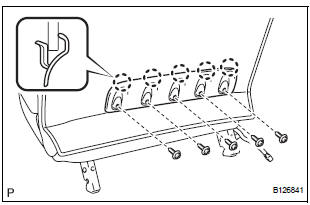
- Remove the 5 screws.
- Disengage the 5 claws and remove the rear No. 2 seat cover bezel.
2. REMOVE REAR SEAT RECLINING COVER LH
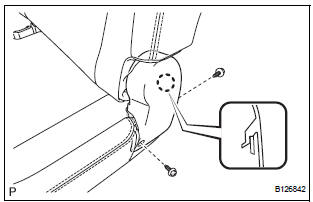
- Remove the 2 screws.
- Disengage the claw and remove the rear seat reclining cover LH.
3. REMOVE REAR SEAT RECLINING COVER RH
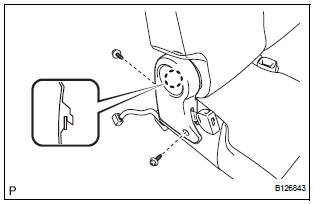
- Remove the 2 screws.
- Disengage the claw and remove the rear seat reclining cover RH.
4. REMOVE REAR SEAT HEADREST ASSEMBLY
5. REMOVE REAR NO. 2 SEAT HEADREST SUPPORT ASSEMBLY LH
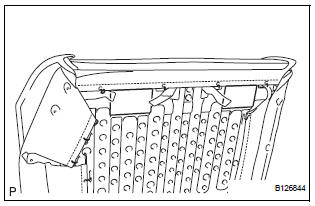
- Remove the 2 pads.
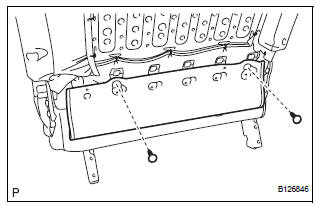
- Remove the 2 clips.
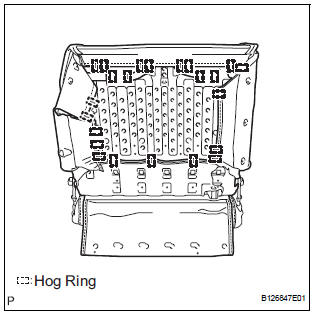
- Remove the 23 hog rings and disconnect the No. 2 seatback cover sub-assembly with pad.
- Turn back the No. 2 seatback cover sub-assembly.
- Disengage the 4 claws and remove both rear No. 2 seat headrest support assemblies LH.
6. REMOVE REAR NO. 2 SEAT HEADREST SUPPORT ASSEMBLY RH
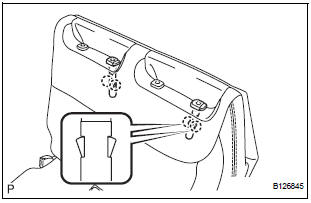
HINT: Use the same procedure described for the LH side.
7. REMOVE NO. 2 SEATBACK COVER SUB-ASSEMBLY WITH PAD
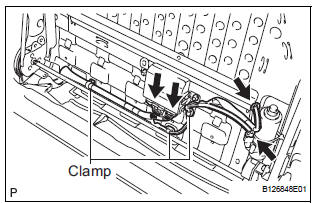
- Disconnect the connectors.
- Disengage the 3 clamps and remove the No. 2 seatback cover sub-assembly with pad.
8. REMOVE NO. 2 SEATBACK COVER SUB-ASSEMBLY
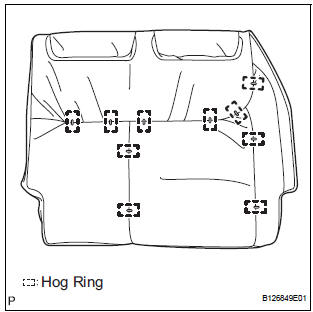
- Remove the 10 hog rings and No. 2 seatback cover sub-assembly.
9. REMOVE NO. 2 SEATBACK PAD
10. REMOVE FOLD SEAT CONTROL ECU
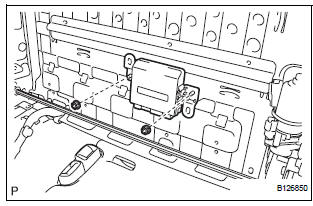
- Remove the 2 nuts and fold seat control ECU.
11. REMOVE NO. 2 SEATBACK FRAME SUB-ASSEMBLY
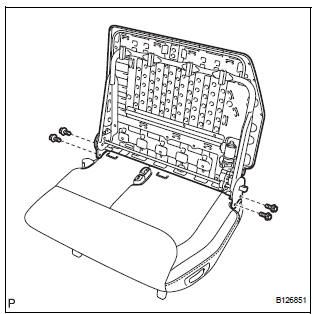
- Remove the 4 bolts and No. 2 seatback frame subassembly.
12. REMOVE RECLINING REMOTE CONTROL LEVER BEZEL
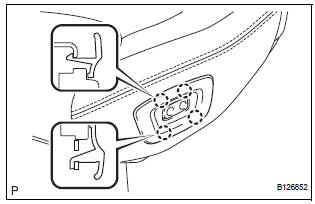
- Disengage the 4 claws and remove the reclining remote control lever bezel.
13. REMOVE REAR POWER SEAT SWITCH
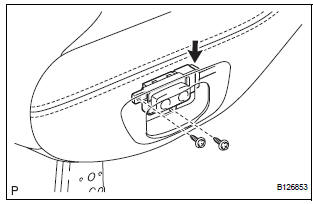
- Remove the 2 screws.
- Disconnect the connector and remove the rear power seat switch.
14. REMOVE REAR NO. 2 SEAT LAP BELT ASSEMBLY CENTER WITH INNER
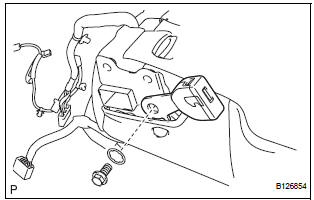
- Remove the bolt, washer and rear No. 2 seat lap belt assembly center with inner.
15. REMOVE REAR NO. 2 SEAT BELT ASSEMBLY INNER
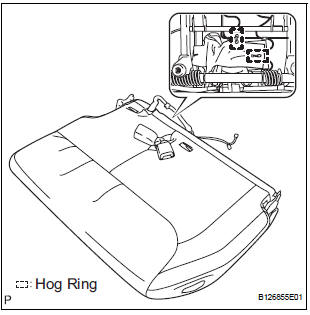
- Remove the 2 hog rings.
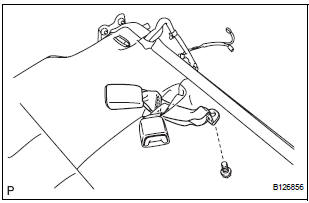
- Remove the bolt and rear No. 2 seat belt assembly inner.
16. REMOVE REAR SEAT BELT ASSEMBLY INNER
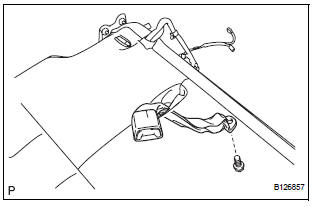
- Remove the bolt and rear seat belt assembly inner.
17. REMOVE REAR SEAT COVER
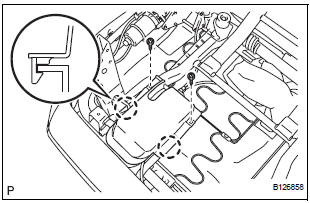
- Remove the 2 screws.
- Disengage the 2 claws and remove the rear seat cover.
18. REMOVE NO. 2 SEAT CUSHION COVER SUBASSEMBLY WITH PAD
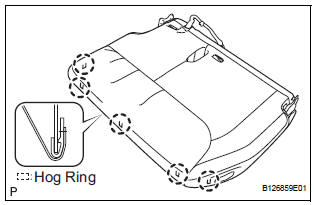
- Raise the 5 rear seat cushion edge protectors.
- Disengage the hooks and remove the No. 2 seat cushion cover sub-assembly with pad.
19. REMOVE NO. 2 SEAT CUSHION COVER SUBASSEMBLY
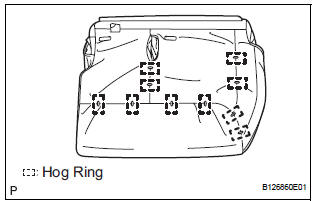
- Remove the 10 hog rings and No. 2 seat cushion cover sub-assembly.
20. REMOVE NO. 2 SEAT CUSHION PAD
21. REMOVE REAR SEAT WIRE
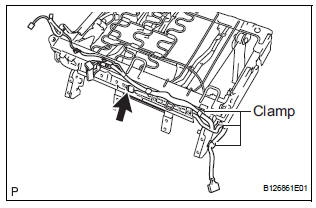
- Disconnect the connector.
- Disengage the 3 clamps and remove the rear seat wire.
22. REMOVE NO. 2 SEAT CUSHION STOPPER
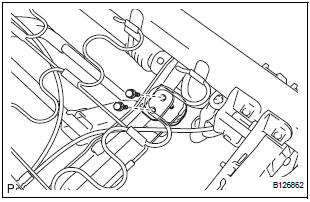
- Remove the 2 bolts and No. 2 seat cushion stopper.
HINT: Use the same procedure to remove the other stopper.
23. REMOVE NO. 2 SEAT CUSHION SPRING ASSEMBLY
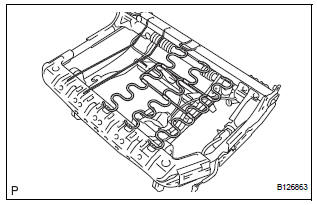
- Remove the No. 2 seat cushion spring assembly.
24. REMOVE NO. 2 SEAT CUSHION FRAME SUBASSEMBLY
25. REMOVE NO. 2 SEAT LEG SUB-ASSEMBLY
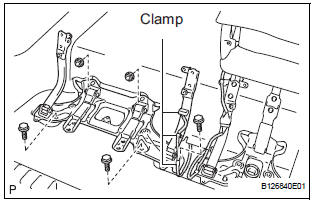
- Disengage the 3 clamps.
- Remove the 3 bolts, 2 nuts and No. 2 seat leg subassembly.
 Removal
1. DISCONNECT CABLE FROM NEGATIVE BATTERY
TERMINAL
2. REMOVE REAR NO. 2 SEAT LEG SIDE GARNISH SUB-ASSEMBLY
Disengage the 9 clips and remove the rear No. 2
seat leg side garnish sub-a ...
 Adjustment
HINT:
If the malfunction does not disappear by following the
procedure in ADJUSTMENT and the rear No. 2 seat
assembly needs to be replaced, do not disassemble the rear
No. 2 seat assembly.
1. ADJ ...
Other materials:
Removal
1. REMOVE BATTERY (See page EM-26)
2. REMOVE NO. 2 AIR CLEANER INLET (See page EM-
28)
3. REMOVE AIR CLEANER CAP SUB-ASSEMBLY (See
page FU-13)
4. REMOVE AIR CLEANER FILTER ELEMENT (See page
EM-28)
5. REMOVE AIR CLEANER CASE SUB-ASSEMBLY (See
page EM-28)
6. REMOVE AIR CLEANER BRACKET
(a ...
Installation
1. INSTALL YAW RATE AND DECELERATION SENSOR
(a) Connect the yawrate sensor connector.
(b) Install the yawrate sensor with the 2 bolts.
Torque: 13 N*m (136 kgf*cm, 10 ft.*lbf)
2. INSTALL COWL SIDE TRIM BOARD RH
(a) Install the nut with the cowl side trim board plate
RH.
3. INSTALL FRONT ...
Removal
1. DRAIN BRAKE FLUID
NOTICE:
Wash brake fluid off immediately if it adheres to any
painted surface.
2. DISCONNECT BATTERY NEGATIVE TERMINAL
3. REMOVE AIR CLEANER ASSEMBLY WITH HOSE
4. REMOVE BRAKE ACTUATOR WITH BRACKET
(a) Release the latch of the brake actuator connector to
disconnect the c ...
