
Toyota Sienna Service Manual: Disassembly
1. INSPECT UNDERDRIVE PACK CLEARANCE
HINT: (See page AX-262)
2. REMOVE UNDERDRIVE CLUTCH FLANGE NO.2 HOLE SNAP RING
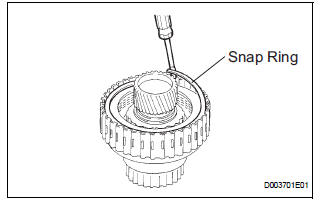
a) Using a screwdriver, remove the underdrive clutch flange No.2 snap ring.
3. REMOVE UNDERDRIVE CLUTCH DISC NO.1
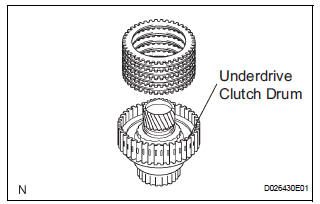
(a) Remove the flange, 4 discs and 4 plates from the underdrive clutch drum.
4. REMOVE UNDERDRIVE CLUTCH RETURN SPRING SUB-ASSEMBLY
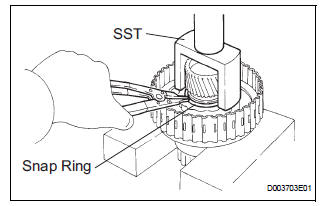
(a) Place SST on the clutch balancer and compress the spring with a press.
SST 09350-32014
(b) Using a snap ring expander, remove the snap ring.
NOTICE:
- Stop the press when the spring seat is lowered to the place 1 to 2 mm (0.039 to 0.078 in.) from the snap ring groove.
- This prevents the spring seat from being deformed.
- Do not expand the snap ring excessively.
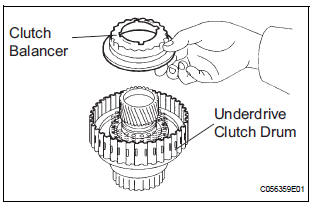
(c) Remove the clutch balancer from the underdrive clutch drum.
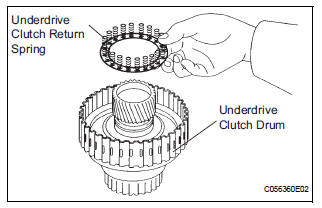
(d) Remove the return spring from the underdrive clutch drum.
5. REMOVE UNDERDRIVE CLUTCH PISTON SET
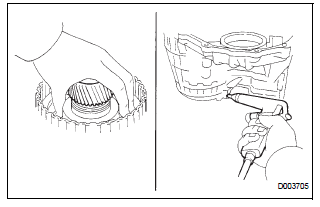
(a) Install the underdrive clutch to the transaxle case.
NOTICE: Be careful not to damage the oil seal ring.
(b) Holding the underdrive clutch piston by hand, apply compressed air (392 kPa, 4.0 kgf/cm2, 57 psi) to the transaxle case to remove the underdrive clutch piston.
6. REMOVE UNDERDRIVE CLUTCH DRUM O-RING
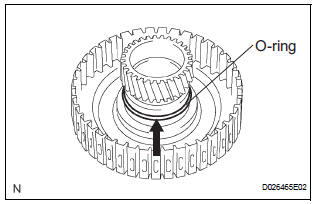
(a) Using a screwdriver, remove the O-ring from the underdrive clutch drum.
 Underdrive clutch
COMPONENTS
...
 Inspection
1. INSPECT UNDERDRIVE PACK CLEARANCE
(a) Install the underdrive clutch to the transaxle case.
NOTICE:
Be careful not to damage the oil seal rings.
(b) Install a dial indicator as shown in the ...
Other materials:
Rear Clearance Sonar Sensor LH Circuit
DESCRIPTION
An ultrasonic sensor consists of a sensor portion that transmits and receives
ultrasonic waves and a preamplifier
that amplifies them. The ultrasonic sensor outputs the ultrasonic waves and
sends the received
signals to the clearance warning ECU.
WIRING DIAGRAM
INSPECTION PR ...
Control Module Performance
DTC P0607 Control Module Performance
DESCRIPTION
The ECM continuously monitors its main and sub CPUs. This self-check ensures
that the ECM is
functioning properly. If outputs from the CPUs are different and deviate from
the standards, the ECM will
illuminate the MIL and set a DTC immediately ...
PBD Pulse Sensor Malfunction
DTC B2222 PBD Pulse Sensor Malfunction
DESCRIPTION
A pulse sensor is built into the back door for a jam and foreign
object detection and for back door
position detection. The jam and foreign object detection feature of the
pulse sensor monitors the
operating speed of the back door whi ...
