
Toyota Sienna Service Manual: Disc cannot be Played/ No Playable Files/ Copyright Protection Error/ Disc cannot be Played/ No Playable Files/ Copyright Protection Error
DTC 62-7D Disc cannot be Played
DTC 62-7E No Playable Files
DTC 62-7F Copyright Protection Error
DTC 63-7D Disc cannot be Played
DTC 63-7E No Playable Files
DTC 63-7F Copyright Protection Error
DESCRIPTION
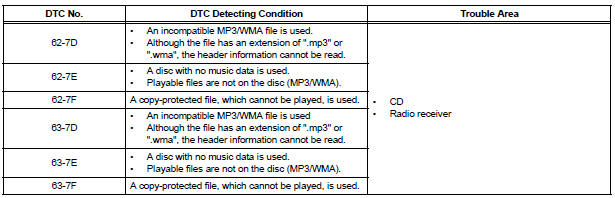
INSPECTION PROCEDURE
HINT: After the inspection is completed, clear the DTCs.
1 CHANGE DISC
- Insert a disc with a playable file and check if the disc can be played correctly.
HINT: For details on playable files and discs, refer to the Owner's Manual.
OK: The disc can be played correctly.
END
 DSP Error/ DSP Error
DTC 62-78 DSP Error
DTC 63-78 DSP Error
DESCRIPTION
INSPECTION PROCEDURE
HINT:
After the inspection is completed, clear the DTCs.
NOTICE:
These codes may be output even if there is ...
 Noise Occurs
INSPECTION PROCEDURE
1 NOISE CONDITION
Check in which direction the noise comes from (front left
or right, or rear left or right).
Check in which direction the noise comes from.
OK:
T ...
Other materials:
Installation
1. INSTALL INSTRUMENT PANEL SAFETY PAD SUBASSEMBLY
Using a torque wrench, install the bolt <B>.
Torque: 20 N*m (204 kgf*cm, 14 ft.*lbf)
2. INSTALL SHIFT LEVER ASSEMBLY
Using a torque wrench, install the 4 bolts.
Torque: 21 N*m (214 kgf*cm, 12.6 ft.*lbf)
3. ...
Power outlets
The power outlet can be used for the following components:
12 V: Accessories that run on less than 10 A
120 V AC: Accessories that use less than 100 W
12 V
Open the cover.
Center panel type A
Center panel type B
Luggage compartment
120 V AC (if equipped)
Open the ...
Terminals of ECU
1. RADIO AND NAVIGATION ASSEMBLY
*1: with Rear Seat Entertainment System
Reference: waveform 1
HINT:
Terminal: VV+ - VV-
Gauge set: 200 mV/DIV, 10 μs/DIV
Condition: DVD is played on radio and navigation
assembly
Reference: wave ...
