
Toyota Sienna Service Manual: Audio and visual system
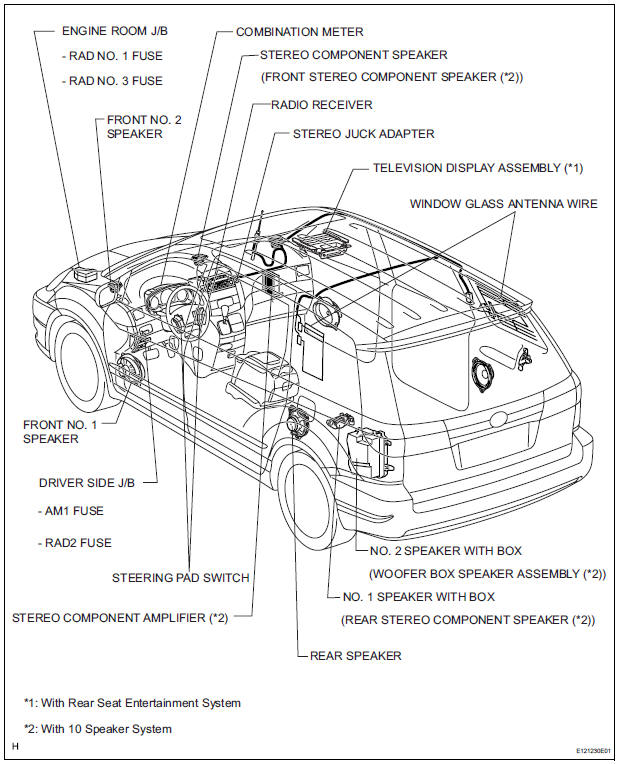
PARTS LOCATION
SYSTEM DIAGRAM
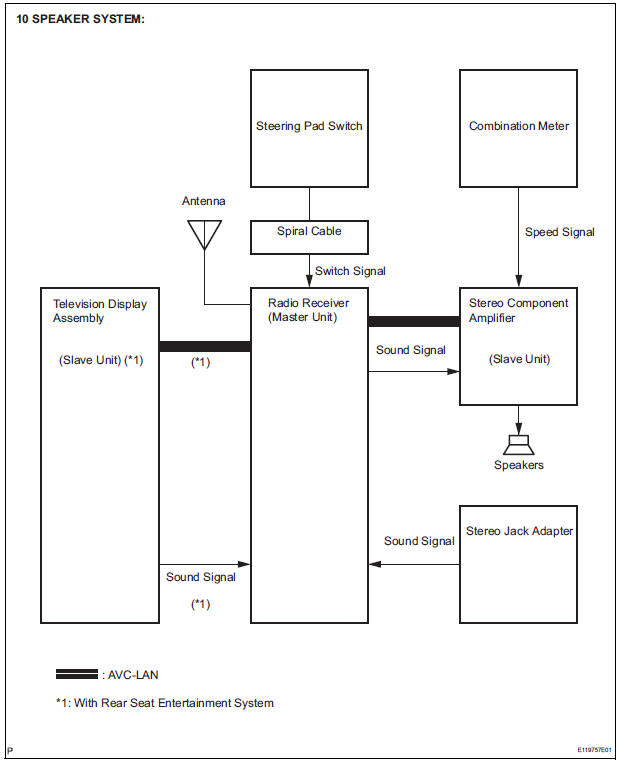

- System diagram
- How to proceed with troubleshooting
- Identification of noise source
- Problem symptoms table
- Terminals of ECU
- DTC check / clear
- Diagnostic trouble code chart
 Audio / visual
...
 System diagram
1. DISC PLAYER OUTLINE
A CD player uses a laser pickup to read digital
signals recorded on CDs. By converting the digital
signals to analog, music and other content can be
played.
C ...
Other materials:
Glove boxes
Upper glove box
Push the button.
Open the lid.
Lower glove box
The lower glove box can be opened by pulling the lever and can be
locked and unlocked by using the master key (vehicles without a
smart key) or the mechanical key (vehicles with a smart key system).
Unlo ...
Dinghy towing
Your vehicle is not designed to be dinghy towed (with 4 wheels
on the ground) behind a motor home.
NOTICETo avoid serious damage to your vehicle
Do not tow your vehicle with four wheels
on the ground.
To prevent causing serious damage to the transaxle and Active
Torque ...
Disassembly
1. REMOVE FRONT DISC BRAKE BUSH DUST BOOT
(a) Using soft jaws on the vise, hold the front disc brake
cylinder mounting LH in the vise through aluminum
plates.
(b) Using a screwdriver and hammer, remove the 2
front disc brake bush dust boots from the front disc
brake cylinder mounting LH. ...
