
Toyota Sienna Service Manual: Driver Side Seat Belt Warning Light does not Operate
DESCRIPTION
When turning the ignition switch to the ON position, the combination meter assembly communicates with the supplemental restraint system by the multiplex communication system. Unless the driver side seat belt is fastened, the combination meter assembly will turn on the seat belt warning light for driver side. If the driver side seat belt is fastened, then the combination meter assembly will turn off the driver side seat belt warning light.
WIRING DIAGRAM
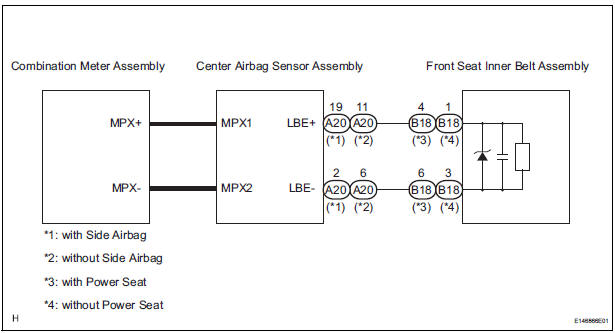
INSPECTION PROCEDURE
1 CHECK MULTIPLEX COMMUNICATION SYSTEM
- Check if the MULTIPLEX communication DTC is output
Result

2 PERFORM ACTIVE TEST BY INTELLIGENT TESTER
- Connect the intelligent tester to the DLC3.
- Turn the ignition switch to the ON position.
- Enter the following menus: DIAGNOSIS / OBD/MOBD / METER / ACTIVE TEST.
- Check the operation by referring to the value(s) in the table below.
METER:

OK: Warning light condition (ON/OFF) can be switched by "ACTIVE TEST".
3 CHECK DTC
- Check if DTC B0126 is output
Result

REPLACE CENTER AIR BAG SENSOR ASSEMBLY
 Engine Coolant Temperature Receiver Gauge Malfunction
DESCRIPTION
The meter CPU receives engine coolant temperature signals from the ECM via
the multiplex
communication lines. The meter CPU displays engine coolant temperature that is
calculated bas ...
 Operating Light Control Rheostat does not Change Light Brightness
DESCRIPTION
The meter CPU receives signals for adjusting illumination on the meter from
this circuit. The meter CPU
detects the illumination level selected by the user according to the position of ...
Other materials:
A Remote Control System does not Operate
INSPECTION PROCEDURE
1 CHECK SYSTEM
Check that the remote control operation of the rear
system is not locked by the radio receiver or the radio
and navigation assembly.
Check if "Rear System Locked" appears on the
television display assembly.
OK:
The message ...
Room light assembly
ON-VEHICLE INSPECTION
1. ROOM LIGHT ASSEMBLY NO.2
Check that the resistance exists between the
terminals.
Resistance:
Below 1 Ω
2. INTERIOR DOME LIGHT SWITCH ASSEMBLY
Check that there is resistance between the
terminals at each switch position as shown in the
cha ...
Installation
HINT:
Use the same procedures for the RH side and LH side.
The procedures listed below are for the LH side.
1. INSTALL CURTAIN SHIELD AIRBAG ASSEMBLY LH
Install the curtain shield airbag assembly LH with
the 13 bolts in the order shown in the illustration.
Tor ...
