
Toyota Sienna Service Manual: Engine coolant temperature sensor
COMPONENTS
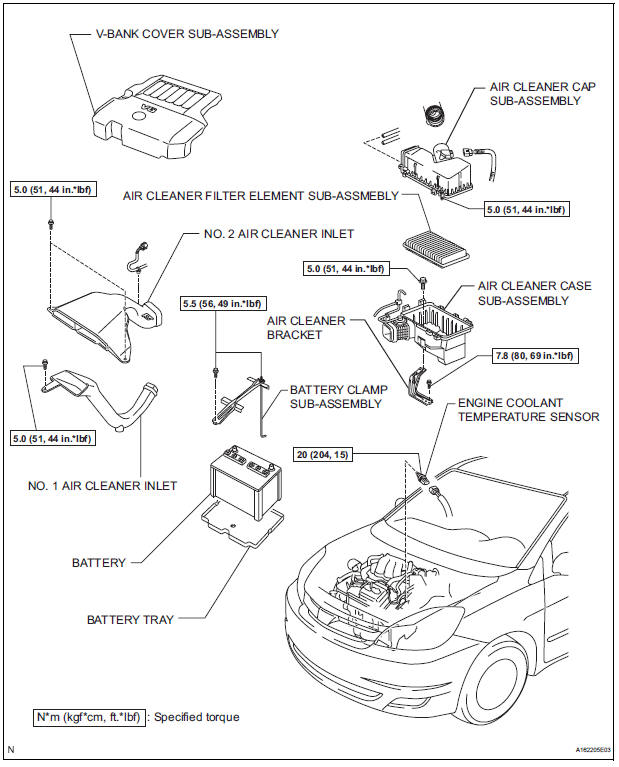
REMOVAL
1. DRAIN ENGINE COOLANT (See page CO-6) 2. REMOVE V-BANK COVER SUB-ASSEMBLY (See page EM-28) 3. REMOVE NO. 2 AIR CLEANER INLET (See page EM- 28) 4. REMOVE NO. 1 AIR CLEANER INLET (See page EM- 28) 5. REMOVE AIR CLEANER CAP SUB-ASSEMBLY (See page ES-493) 6. REMOVE AIR CLEANER CASE SUB-ASSEMBLY (See page EM-28) 7. REMOVE ENGINE COOLANT TEMPERATURE SENSOR
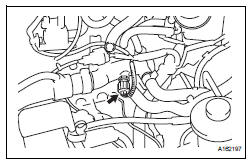
(a) Remove the engine coolant temperature sensor connector.
(b) Remove the engine coolant temperature sensor.
INSPECTION
1. INSPECT ENGINE COOLANT TEMPERATURE SENSOR
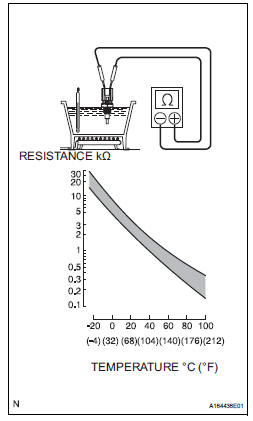
(a) Using an ohmmeter, measure the resistance between the terminals.
Standard resistance 
- If the result is as specified, do not replace the engine coolant temperature sensor
- If the result is not as specified, replace the engine coolant temperature sensor.
| NOTICE: In case of checking the engine coolant temperature sensor in water, do not allow water to go into the terminals. After checking, dry the engine coolant temperature sensor. |
INSTALLATION
1. INSTALL ENGINE COOLANT TEMPERATURE SENSOR
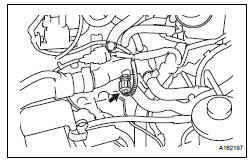
(a) Install the engine coolant temperature sensor.
Torque: 20 N*m (204 kgf*cm, 15 ft.*lbf) (b) Connect the engine coolant temperature sensor connector.
2. INSTALL AIR CLEANER CASE SUB-ASSEMBLY (See page EM-59) 3. INSTALL AIR CLEANER CAP SUB-ASSEMBLY (See page ES-496) 4. INSTALL NO. 1 AIR CLEANER INLET (See page EM- 59) 5. INSTALL NO. 2 AIR CLEANER INLET (See page EM- 60) 6. ADD ENGINE COOLANT (See page CO-7) 7. INSPECT FOR ENGINE COOLANT LEAK (See page CO-1) 8. INSTALL V-BANK COVER SUB-ASSEMBLY (See page EM-63)
 Crankshaft position sensor
Components
Removal
1. Remove compressor and magnetic clutch
HINT:
(See page AC-227 )
2. REMOVE CRANKSHAFT POSITION SENSOR
(a) Disconnect the crankshaft position sensor
connector.
(b) R ...
 Knock sensor
COMPONENTS
REMOVAL
1. DISCHARGE FUEL SYSTEM PRESSURE
(See page FU-13)
2. REMOVE V-BANK COVER SUB-ASSEMBLY (See
page EM-28)
3. DRAIN ENGINE COOLANT (See page CO-6)
4. REMOVE WINDSHIE ...
Other materials:
Precaution
1. INSPECTION PROCEDURE FOR VEHICLE INVOLVED
IN ACCIDENT
Perform the zero point calibration and sensitivity
check if any of the following conditions occur.
The occupant classification ECU is replaced.
Accessories (seatback tray and seat cover, etc.)
are installed.
...
Power Slide Door RH does not Operate When Using Inside / Outside
Handle
DESCRIPTION
The inside / outside handles have the ability to control operation
of the power slide door. Pulling either
handle transmits a request signal to the power slide door ECU RH, which then
commands the power
slide door control motor and clutch to open / close the power sli ...
Occupant Classification ECU Malfunction
DTC B1795 Occupant Classification ECU Malfunction
DESCRIPTION
DTC B1795 is recorded when a malfunction is detected in the occupant
classification ECU.
Troubleshoot DTC B1771 first when the DTCs B1771 and B1795 are output
simultaneously.
DTC No.
DTC Detecting Condition
...
