
Toyota Sienna Service Manual: Engine front oil seal
COMPONENTS
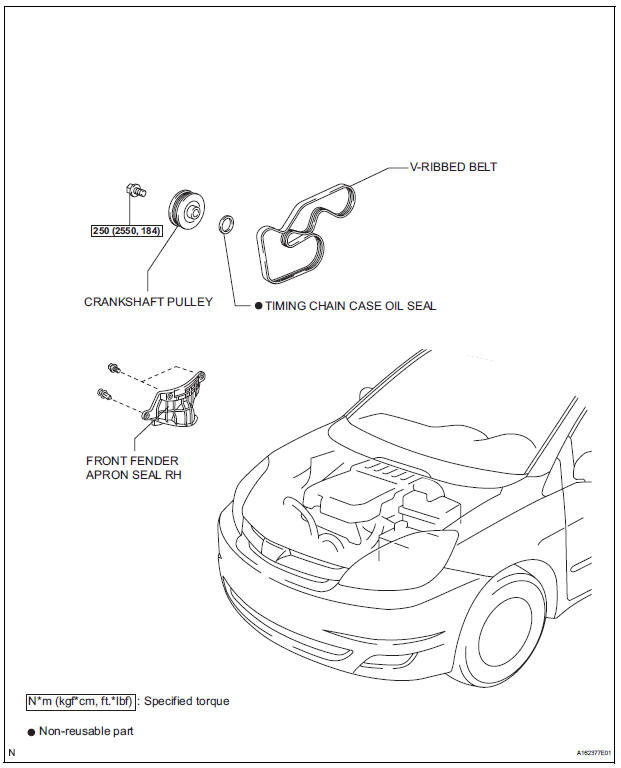
REMOVAL
1. REMOVE FRONT WHEEL RH 2. REMOVE FRONT FENDER APRON SEAL RH (See page EM-26) 3. REMOVE V-RIBBED BELT (See page EM-6) 4. REMOVE CRANKSHAFT PULLEY
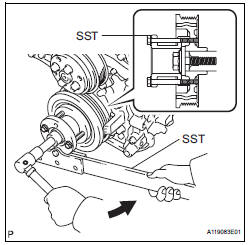
(a) Using SST, loosen the crankshaft pulley bolt.
SST 09213-70011 (09213-70020), 09330-00021
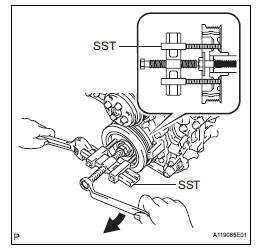
(b) Using SST, remove the crankshaft pulley bolt and crankshaft pulley.
SST 09950-50013 (09951-05010, 09952-05010, 09953-05020, 09954-05021)
5. REMOVE TIMING CHAIN CASE OIL SEAL
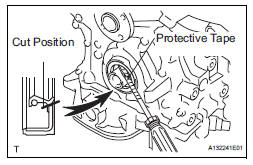
(a) Using a screwdriver, pry out the oil seal.
HINT:
Tape the screwdriver tip before use.
| NOTICE: After the removal, check the crankshaft for damage. If it is damaged, smooth the surface with 400-grit sandpaper. |
INSTALLATION
1. INSTALL TIMING CHAIN CASE OIL SEAL
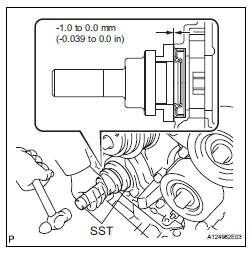
(a) Apply MP grease to a new oil seal lip.
(b) Using SST and a hammer, tap in the oil seal until its surface is flush with the timing chain cover edge.
SST 09223-22010, 09506-35010
NOTICE:
|
2. INSTALL CRANKSHAFT PULLEY
(a) Align the pulley set key with the key groove of the pulley, and slide on the pulley.
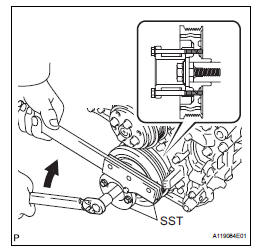
(b) Using SST, install the pulley bolt.
SST 09213-70011 (09213-70020), 09330-00021 Torque: 250 N*m (2550 kgf*cm, 184 ft.*lbf)
3. INSTALL V-RIBBED BELT (See page EM-7) 4. INSTALL FRONT FENDER APRON SEAL RH (See page EM-62) 5. INSTALL FRONT WHEEL RH Torque: 103 N*m (1050 kgf*cm, 76 ft.*lbf)
 Drive belt
COMPONENTS
REMOVAL
1. REMOVE FRONT WHEEL RH
2. REMOVE FRONT FENDER APRON SEAL RH (See
page EM-26)
3. REMOVE V-RIBBED BELT
(a) Using SST, release the belt tension by turning the
belt tensi ...
 Engine rear oil seal
Components
Removal
1. REMOVE AUTOMATIC TRANSAXLE ASSEMBLY (for
2WD)
HINT:
See page AX-163.
2. REMOVE AUTOMATIC TRANSAXLE ASSEMBLY (for
4WD)
HINT:
See page AX-167.
3. REMOVE DRIVE PLATE A ...
Other materials:
How to proceed with
troubleshooting
1 VEHICLE BROUGHT TO WORKSHOP
2 CUSTOMER PROBLEM ANALYSIS
3 CHECK AND CLEAR DTCs
Refer to the diagnostic check/clear
4 PROBLEM SYMPTOM CONFIRMATION
5 SYMPTOM SIMULATION
6 CHECK DTC
7 CHECK IF THE SAME SYMPTOM APPEARS IN THE NAVIGATION SYSTEM
Refer to the navigation system
8 PROBLE ...
Indicators
The indicators inform the driver of the operating state of the vehicle’s
various systems.
*1: If equipped
*2: These lights turn on when the engine switch is turned to the “ON� position
(vehicles without a smart key system) or IGNITION ON mode (vehicles
with a smart key system) to ...
Short to B+ in Curtain Shield Squib RH Circuit
DTC B1163/82 Short to B+ in Curtain Shield Squib RH Circuit
DESCRIPTION
The curtain shield squib RH circuit consists of the center airbag sensor
assembly and the curtain shield
airbag assembly RH.
The circuit instructs the SRS to deploy when deployment conditions are met.
DTC B1163/82 is ...
