
Toyota Sienna Service Manual: GPS Mark is not Displayed
INSPECTION PROCEDURE
1 CHECK CABIN
- Check the cabin for any object that might interrupt radio reception on the instrument panel. If such an object exists, remove it and check if the GPS mark reappears.
HINT: The GPS uses extremely faint radio waves originating from satellites. If the signal is interrupted by obstructions or other radio waves, the GPS may not be able to properly receive the signal.
OK: Mark appears
NORMAL OPERATION
2 CHECK SURROUNDINGS
- Check if the vehicle is in a location where GPS signal reception is poor. If the vehicle is in such a place, relocate the vehicle and check if the GPS mark reappears.
HINT: The GPS uses 24 satellites in 6 orbits. At any point in time, 4 satellites should be able to pinpoint your vehicle.
However, GPS signals may not reach the vehicle due to influence from the surroundings, vehicle direction, and time. For illustrated examples, see below.
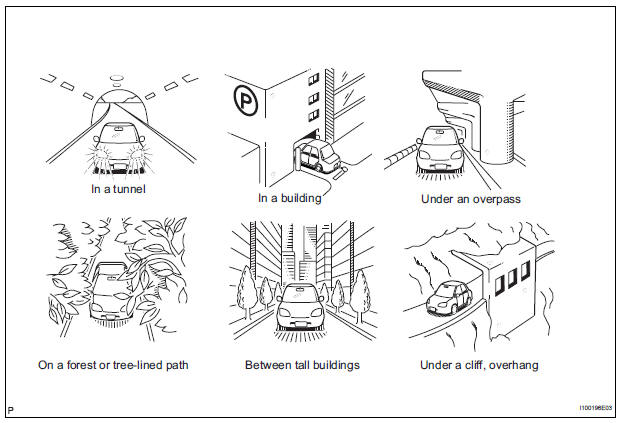
OK: GPS mark is displayed.
SYSTEM RETURNS TO NORMAL
3 CHECK GPS INFORMATION (NAVIGATION CHECK MODE)
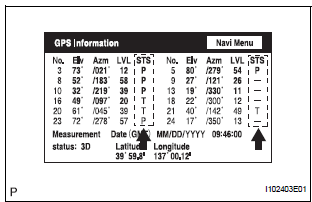
- Enter the "Navigation Check" mode (GPS Information).
- Check how many of the following codes appear in the "STS" column.
For DENSO Made:
T, P
For AISIN AW Made:
08H, 04H
OK: At least 3 codes appear
REPLACE RADIO AND NAVIGATION ASSEMBLY
 Current Position Display does not Appear
INSPECTION PROCEDURE
1 CHECK RADIO AND NAVIGATION ASSEMBLY
Check if a map disc is inserted into the map disc slot.
OK:
A map disc is inserted
2 CHECK MAP DISC
Check that the map ...
 Voice Guidance does not Function
INSPECTION PROCEDURE
1 CHECK NAVIGATION SYSTEM SETTING
Enter the "Menu" screen by pressing the "MENU" switch.
Select "Volume".
Check that " ...
Other materials:
Connecting a Bluetooth®
device
Up to 5 Bluetooth® devices (Phones [HFP] and audio players
[AVP]) can be registered.
If more than 1 Bluetooth® device has been registered, select
which device to connect to.
Press the “SETUP� button.
Select “Bluetooth*�.
*: Bluetooth is a registered trademark of Bluetooth SI ...
Removal
1. DRAIN POWER STEERING FLUID
2. REMOVE FRONT WHEEL RH
3. REMOVE FRONT FENDER APRON SEAL RH (See
page EM-26)
4. REMOVE FAN AND GENERATOR V BELT (See page
EM-6)
5. DISCONNECT NO. 1 FLUID RESERVOIR TO PUMP HOSE
(a) Slide the clip and disconnect the No. 1 fluid
reservoir to pump hose from t ...
Precaution
1. GENERAL PRECAUTION
When using the battery during inspection, do not
bring the positive and negative tester probes too
close to each other as a short circuit may occur.
PARTS LOCATION
SYSTEM DIAGRAM
1. SIGNAL COMMUNICATION TABLE
Driver Side Power Seat (w ...
