
Toyota Sienna Service Manual: Voice Guidance does not Function
INSPECTION PROCEDURE
1 CHECK NAVIGATION SYSTEM SETTING
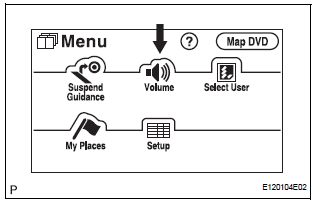
- Enter the "Menu" screen by pressing the "MENU" switch.
- Select "Volume".
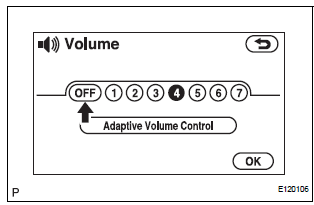
- Check that "OFF" is not selected.
OK: "OFF" is not selected
2 CHECK NAVIGATION SETTING
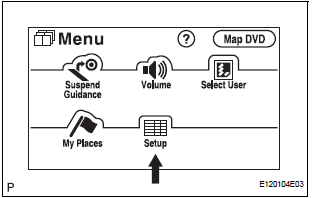
- Enter the "Menu" screen by pressing the "MENU" switch.
- Select "Set up".
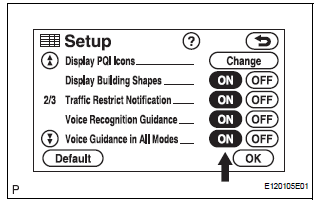
- Check that "Voice Guidance in All Modes" is not OFF.
OK: Voice guidance in all modes is not OFF.
3 CHECK NAVIGATION SETTING
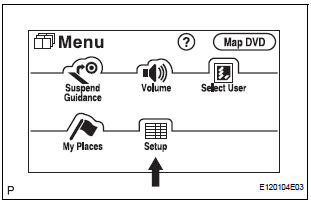
- Enter the "Menu" screen by pressing the "MENU" switch.
- Select "Setup".
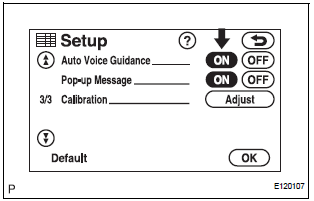
- Check that "Auto Voice Guidance" is not OFF.
OK: Auto voice guidance is not OFF
4 CHECK MAP DISC
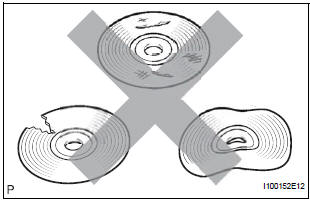
- Check that the map disc is not deformed or cracked.
OK: No deformations or cracks on map disc.
5 CHECK RADIO AND NAVIGATION ASSEMBLY
- Check that audio sound can be heard from the driver side speaker.
OK: Audio sound can be heard
REPLACE RADIO AND NAVIGATION ASSEMBLY
 GPS Mark is not Displayed
INSPECTION PROCEDURE
1 CHECK CABIN
Check the cabin for any object that might interrupt radio
reception on the instrument panel. If such an object
exists, remove it and check if the GPS mark r ...
 Map Display Incomplete
INSPECTION PROCEDURE
1 CHECK MAP DISC
Check that the map disc is not deformed or cracked.
OK:
No deformations or cracks on map disc.
2 CHECK DISPLAY
Check that displays other than th ...
Other materials:
Installation
1. INSTALL BRAKE PEDAL SUPPORT ASSEMBLY
(a) Install the brake pedal support sub-assembly with
the 4 nuts.
Torque: 16 N*m (160 kgf*cm, 12 ft.*lbf)
(b) Install the clip and clevis pin to the brake pedal
lever.
(c) Using needle-nose pliers, install the tension spring.
(d) Install the ...
On-vehicle cleaning
1. INSPECT RADIATOR ASSEMBLY
(a) Check that the radiator and condenser are not
blocked with leaves, dirt, or insects. Clean the hose
connections.
If the fins are blocked, wash them with water or a
steam cleaner.
NOTICE:
If the distance between the steam cleaner and
core is ...
Installation
1. INSTALL FRONT DOOR WINDOW FRAME MOULDING
Remove the tape from the front door window frame
moulding.
Clean the contact surface of the vehicle body with
white gasoline.
Clean the outer circumference of the front door
window frame moulding with white gasoline.
Apply new double-si ...
