
Toyota Sienna Service Manual: Installation
HINT: Install the RH side by the same procedure as the LH side.
1. INSTALL REAR SPEED SENSOR
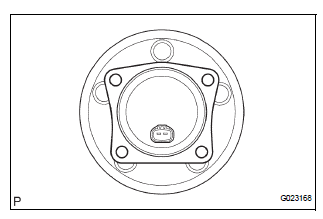
(a) Clean the contacting surface of the axle hub and a new skid control sensor.
NOTICE: Keep the sensor rotor clean.
(b) Place the speed sensor on the axle hub so that the connector is positioned as shown in the illustration.
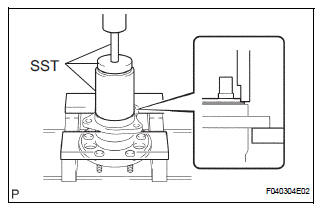
(c) Using SST and a press, install the skid control sensor to the axle hub.
SST 09214-76011
NOTICE:
- Do not tap the skid control sensor with a hammer directly.
- Check that there is no foreign matter on the skid control sensor detection portion.
- Press in the skid control sensor straight and slowly.
2. INSTALL REAR AXLE HUB & BEARING ASSEMBLY LH (See page AH-17)
3. INSTALL REAR BRAKE DRUM SUB-ASSEMBLY (for Drum Type)
(a) Aligning the matchmarks, install the rear brake drum sub-assembly.
4. INSTALL REAR DISC (for Disc Type)
(a) Aligning the matchmarks, install the rear disc.
5. INSTALL REAR DISC BRAKE CALIPER ASSEMBLY LH (for Disc Type)
(a) Install the rear disc brake caliper assembly LH with the 2 bolts.
6. SKID CONTROL SENSOR WIRE
(a) Connect the connector to the skid control sensor connector.
7. INSTALL REAR WHEEL
8. INSPECT AND ADJUST REAR WHEEL ALIGNMENT
HINT: See page SP-9.
9. CHECK ABS SPEED SENSOR SIGNAL
HINT: See page BC-10.
 Inspection
1. INSPECT REAR SPEED SENSOR
(a) Disconnect the skid control sensor connector.
(b) Measure the resistance between terminals 1 and 2
of the skid control sensor connector.
OK:
Resistance:
le ...
 Rear speed sensor (for 4wd)
Components
...
Other materials:
Oil and oil filter
COMPONENTS
REPLACEMENT
CAUTION:
Prolonged and repeated contact with engine oil will
result in the removal of natural oils from the skin,
leading to dryness, irritation and dermatitis. In
addition, used engine oil contains potentially harmful
contaminants which may caus ...
CD Sound Skips
INSPECTION PROCEDURE
1 CHECK CD
Check the CD.
OK:
The CD is clean.
HINT:
If dirt is on the CD surface, wipe it clean with a soft cloth
from the inside to the outside in a radial direction.
NOTICE:
Do not use a conventional record cleaner or antistatic
preservative.
2 CHECK CD
...
Random / Multiple Cylinder Misfire Detected
DESCRIPTION
When the engine misfires, high concentrations of hydrocarbons (HC) enter the
exhaust gas. High HC
concentration levels can cause increase in exhaust emission levels. Extremely
high concentrations of HC
can also cause increases in the Three-Way Catalytic Converter (TWC) tem ...
