
Toyota Sienna Service Manual: Installation
1. INSTALL TRANSFER EXTENSION HOUSING TYPE T OIL SEAL
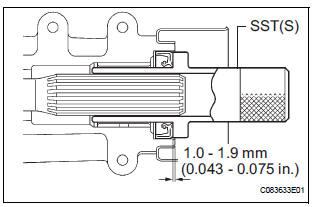
(a) Using SST(s), install anew transfer extension housing type T oil seal to he transfer extension housing sub-assembly at the position show in the illustration.
SST 09325-20010
NOTICE: Do not install the oil seal obliquely.
(b) Apply small amount of MP grease to the oil seal lip.
2. TEMPORARILY TIGHTEN PROPELLER WITH CENTER BEARING SHAFT ASSEMBLY
HINT: (See page PR-9)
3. FULLY TIGHTEN PROPELLER WITH CENTER BEARING SHAFT ASSEMBLY
HINT: (See page PR-9)
4. INSTALL FRONT EXHAUST PIPE ASSEMBLY
HINT: (See page EX-10)
5. INSTALL TRANSFER DRAIN PLUG
(a) Install the transfer drain plug with anew drain gasket.
Torque: 49 N*m (50 kgf*cm, 36 ft.*lbf)
6. INSTALL TRANSFER CASE NO.1 PLUG
(a) Add oil up to 0 to 5 mm (0 to 0.20 in.) below the lower side of the plug hole.
Oil amount: 0.9 L (0.95 US qts, 0.71 lmp.qts)
NOTICE: When supplying oil, pour do it slowly.
(b) Install the transfer case No. 1 plug with a new gasket No. 1.
Torque: 49 N*m (500 kgf*cm, 36 ft.*lbf)
7. CHECK FOR EXHAUST GAS LEAK
 Removal
1. REMOVE TRANSFER CASE NO.1 PLUG (See page
TF-8)
2. REMOVE TRANSFER DRAIN PLUG
(a) Remove the transfer drain plug, drain gasket and
bleed transfer oil.
3. REMOVE EXHAUST PIPE ASSEMBLY
HINT:
(S ...
 Propeller shaft
...
Other materials:
Data list / active test
1. DATA LIST
HINT:
Using the DATA LIST displayed on the intelligent tester,
you can read the value of the switch, sensor, actuator,
etc. without parts removal. Reading the DATA LIST as
the first step of troubleshooting is one way to shorten the
labor time.
Connect the intelligent tester to ...
Window glass antenna wire
INSPECTION
1. INSPECT WINDOW GLASS ANTENNA WIRE
Inspect the wind glass antenna wire.
NOTICE:
When cleaning the glass, use a soft, dry cloth,
and wipe the glass in the direction of the wire.
Take care not to damage the wires. Do not use
detergents or glass cleaners with abrasiv ...
Update contacts from phone
Operation methods differ between PBAP compatible and PBAP
incompatible but OPP compatible Bluetooth® phones.
If your cellular phone is neither PBAP nor OPP compatible, the contacts
cannot be transferred.
For PBAP Compatible Bluetooth® Phones
Select “Update Contacts from Phone�.
Che ...
