
Toyota Sienna Service Manual: Pressure Control Solenoid "A" Performance (Shift Solenoid Valve SL1)

SYSTEM DESCRIPTION
The ECM uses signals from the vehicle speed sensor to detect the actual gear position (1st, 2nd, 3rd, 4th or 5th gear).
Then the ECM compares the actual gear with the shift schedule in the ECM memory
to detect mechanical
problems of the shift solenoid valves, valve body or automatic transaxle
(clutch, brake or gear etc.).
MONITOR DESCRIPTION
The ECM commands gear shifts by turning the shift solenoid valves "ON/OFF". According to the input shaft revolution, intermediate (counter) shaft revolution and output shaft revolution, the ECM detects the actual gear position (1st, 2nd, 3rd, 4th or 5th gear position). When the gear position commanded by the ECM and the actual gear position are not the same, the ECM illuminates the MIL.
HINT: Example: When either condition (a) or (b) is met, the ECM detects a malfunction.
(a) The ECM commands the 1st gear, but the actual gear is 2nd.
(b) The ECM commands the 2nd gear, but the actual gear is 1st.
MONITOR STRATEGY
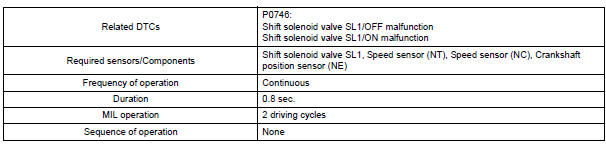
TYPICAL ENABLING CONDITIONS
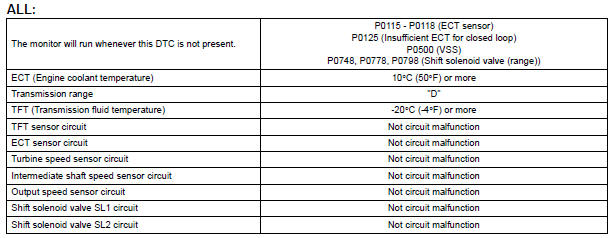
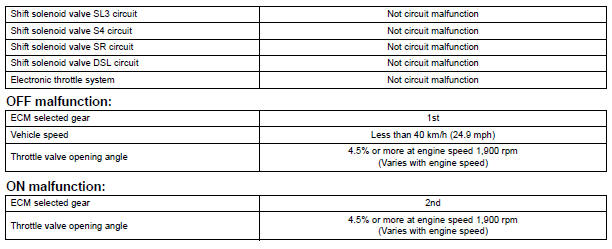
TYPICAL MALFUNCTION THRESHOLDS
Either of the following conditions is met: OFF malfunction
or ON malfunction
OFF malfunction:
2 detections are necessary per driving cycle:
1st detection; temporary flag ON
2nd detection; pending fault code ON
INSPECTION PROCEDURE
HINT: Using the intelligent tester to perform ACTIVE TEST allows relays, VSVs, actuators and other items to be operated without removing any parts. This non-intrusive functional inspection can be very useful because intermittent operation may be discovered before parts or wiring is disturbed. Performing ACTIVE TEST early in troubleshooting is one way to save diagnostic time. DATA LIST information can be displayed while performing ACTIVE TEST.
1. PERFORM ACTIVE TEST
(a) Warm up the engine.
(b) Turn the ignition switch off.
(c) Connect the intelligent tester together with the CAN VIM (controller area network vehicle interface module) to the DLC3.
(d) Turn the ignition switch to the ON position.
(e) Turn on the tester.
(f) Select the item "DIAGNOSIS / ENHANCED OBD II / ACTIVE TEST / SHIFT".
(g) According to the display on the tester, perform the "ACTIVE TEST".
HINT: While driving, the shift position can be forcibly changed with the intelligent tester.
Comparing the shift position commanded by the ACTIVE TEST
with the actual shift position enables you
to confirm the problem (See page AX-30).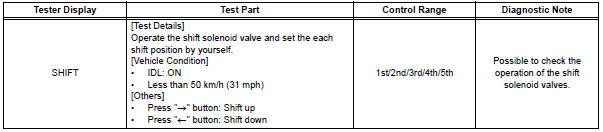
HINT:
- This test can be conducted when the vehicle speed is 50 km/h (31 mph) or less.
- The shift position commanded by the ECM is shown in the DATA LIST/SHIFT display on the intelligent tester.
1 CHECK OTHER DTCS OUTPUT (IN ADDITION TO DTC P0746)
(a) Connect the intelligent tester together with the CAN VIM (controller area network vehicle interface module) to the DLC3.
(b) Turn the ignition switch to the ON position and turn the OBD II scan tool or the intelligent tester main switch ON.
(c) When you use intelligent tester: Select the item "DIAGNOSIS / ENHANCED OBD II / DTC INFO / CURRENT CODES".
(d) Read the DTCs using the OBD II scan tool or the intelligent tester.
Result 
HINT: If any other codes besides "P0746" are output, perform the troubleshooting for those DTCs first.


2 INSPECT SHIFT SOLENOID VALVE SL1
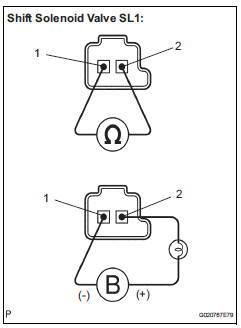
(a) Remove the shift solenoid valve SL1.
(b) Measure the resistance according to the value(s) in the table below.
Standard resistance

(c) Connect the positive (+) lead with a 21 W bulb to terminal 2 and the negative (-) lead to terminal 1 of the solenoid valve connector, then check the movement of the valve.
OK: The solenoid makes an operating sound.


3 INSPECT TRANSMISSION VALVE BODY ASSEMBLY
OK: There are no foreign objects on each valve and they operate smoothly.


4 INSPECT TORQUE CONVERTER CLUTCH ASSEMBLY
OK: The torque converter clutch operates normally.


REPAIR OR REPLACE AUTOMATIC TRANSAXLE ASSEMBLY
 Torque Converter Clutch Solenoid Performance
(Shift Solenoid Valve DSL)
Torque Converter Clutch Solenoid Performance
(Shift Solenoid Valve DSL)
SYSTEM DESCRIPTION
The ECM uses the signals from the throttle position sensor, air-flow meter,
turbine (input) speed sensor,
intermediate (counter) shaft speed sensor and crankshaft position s ...
 Pressure Control Solenoid "A" Electrical (Shift
Solenoid Valve SL1)
Pressure Control Solenoid "A" Electrical (Shift
Solenoid Valve SL1)
DESCRIPTION
Shifting from 1st to 5th is performed in combination with "ON" and "OFF"
operation of the shift solenoid
valves SL1, SL2, SL3, S4 and SR which are controlled by ...
Other materials:
Turn signal lever
Operating instructions
Right turn
Left turn
Lane change to the right (move
the lever partway and release
it)
The right hand signals will flash 3
times.
Lane change to the left (move
the lever partway and release
it)
The left hand signals will flash 3
times.
Turn sign ...
Operation check
1. REMOVE CHECK FUNCTION
Check that the key reminder warning buzzer
sounds.
With the driver side door closed, insert the key
into the ignition key cylinder and then turn the
key to LOCK or ACC.
Check that the buzzer sounds intermittently if
the driver side door ...
Data list / active test
1. DATA LIST
The wireless door lock control data list can be
displayed while the intelligent tester is connected to
the DLC3 with the ignition switch in the ON position.
Follow the prompts on the tester screen to access
the DATA LIST.
BODY:
2. ACTIVE TEST
HINT:
Performing the ACT ...
