
Toyota Sienna Service Manual: Rear evaporator temperature sensor circuit
DESCRIPTION
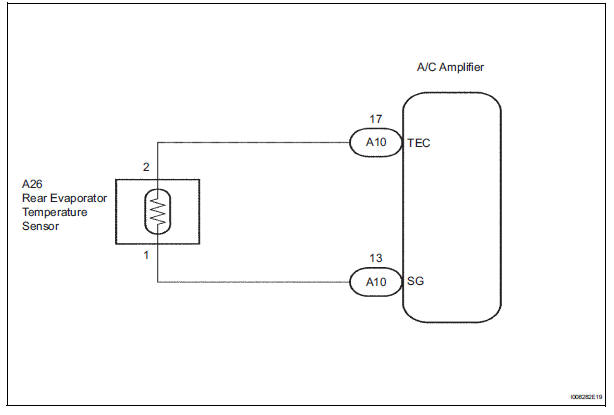
The rear evaporator temperature sensor is installed on the rear evaporator. It detects the rear evaporator temperature. The sensor sends a signal to the A/C amplifier. The resistance of the rear evaporator temperature sensor changes in accordance with the rear evaporator temperature. As the temperature decreases, the resistance increases. As the temperature increases, the resistance decreases.
The A/C amplifier applies voltage (5 V) to the rear evaporator temperature
sensor and reads voltage
changes as the resistance of the rear evaporator temperature sensor changes.

WIRING DIAGRAM
INSPECTION PROCEDURE
1 READ VALUE OF INTELLIGENT TESTER
(a) Connect the intelligent tester to the DLC3.
(b) Turn the ignition switch to the ON position and turn the intelligent tester main switch on.
(c) Select the item below in the DATA LIST, and read the display on the intelligent tester.
DATA LIST / AIR CONDITIONER: 
OK: The display is as specified in the normal condition column.
Result 

2 INSPECT REAR EVAPORATOR TEMPERATURE SENSOR
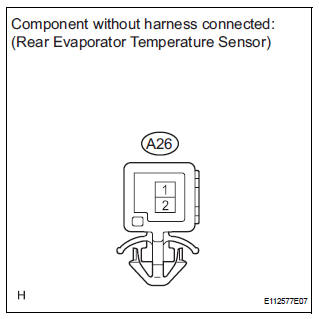
(a) Remove the rear evaporator temperature sensor.
(b) Measure the resistance according to the value(s) in the table below.
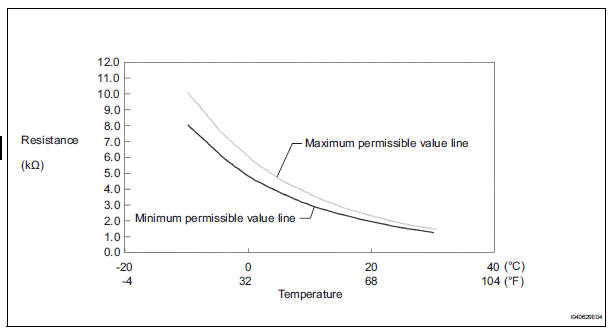
Standard resistance 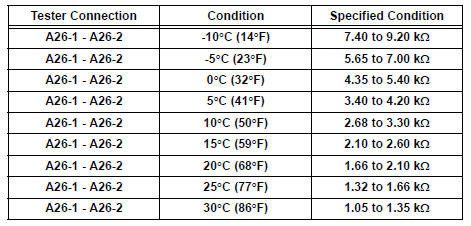
NOTICE:
- Even slightly touching the sensor may change the resistance value. Be sure to hold the connector of the sensor.
- When measuring, the sensor temperature must be the same as the rear evaporator temperature.
HINT: As the temperature increases, the resistance decreases (see the graph).


3 CHECK HARNESS AND CONNECTOR (REAR EVAPORATOR TEMPERATURE SENSOR - A/C AMPLIFIER)
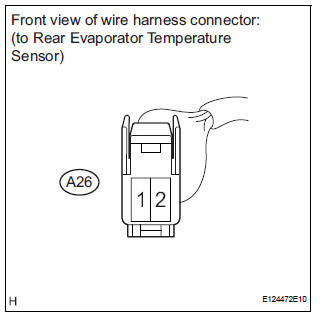
(a) Disconnect the rear evaporator temperature sensor connector.
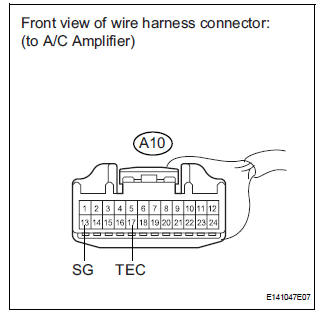
(b) Disconnect the A/C amplifier connector.
(c) Measure the resistance according to the value(s) in the table below.
Standard resistance 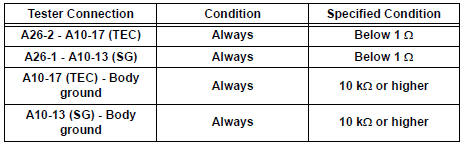


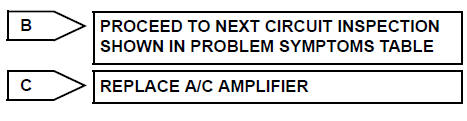
REPLACE A/C AMPLIFIER
 Evaporator temperature sensor circuit
DESCRIPTION
The evaporator temperature sensor (A/C thermistor) is installed on the
evaporator in the air conditioning
unit. It detects the temperature of the cooled air that has passed through the ...
 Rear Room Temperature Sensor Circuit
DESCRIPTION
This sensor detects the rear cabin temperature that is used as the basis for
temperature control and
sends a signal to the A/C amplifier.
WIRING DIAGRAM
INSPECTION PROCEDURE
1 R ...
Other materials:
No. 1 Speaker with box
COMPONENTS
ON-VEHICLE INSPECTION
1. INSPECT NO.1 SPEAKER WITH BOX
HINT:
Remove interior parts so that the No.1 speaker with box
can be seen.
Check the speaker installation.
OK:
The speaker is securely installed.
If the result is not as specified, reinstall the No.1
s ...
Headlight leveling switch
ON-VEHICLE INSPECTION
1. HEADLIGHT LEVELING SWITCH
Connect the battery positive (+) lead to the terminal
1 and the battery negative (-) lead to the terminal 5.
Measure the resistance between the terminal 4 and
the battery negative (-) lead when headlight leveling
switch ...
Problem symptoms table
HINT:
Use the table below to help determine the cause of the
problem symptoms. The potential causes of the symptoms
are listed in order of probability in the ''Suspected Area''
column of the table. Check each symptom by checking the
suspected areas in the order they are listed. Rep ...
