
Toyota Sienna Service Manual: Reassembly
1. INSTALL LIGHT CONTROL ECU (DISCHARGE HEADLIGHT)
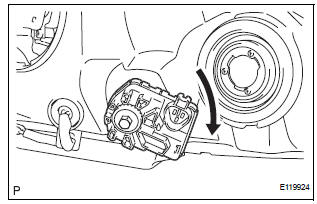
- Install a new headlight leveling motor base packing.
- Install the headlight leveling motor assembly as shown in the illustration.
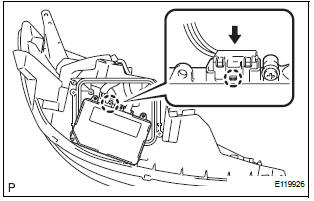
- Connect the connector with the claw
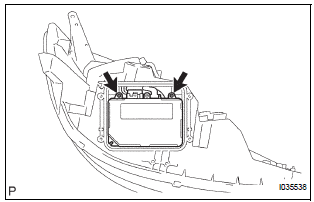
- Install the light control ECU with the 2 screws.
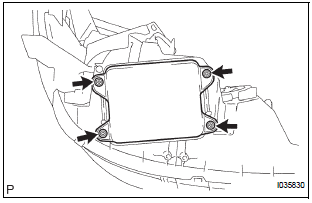
- Install a new headlight gasket.
- Install the headlight cover with the 4 screws.
2. INSTALL FRONT SIDE MARKER LIGHT BULB
- Install the side marker light bulb to the side marker light socket
- Turn in the direction indicated by the arrow and install the side marker light bulb and side marker light socket as a unit.
3. INSTALL FRONT TURN SIGNAL LIGHT BULB
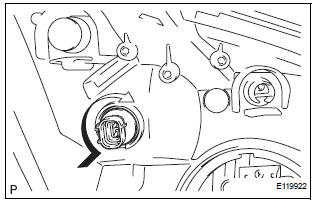
- Install the front turn signal light bulb to the front turn signal light socket.
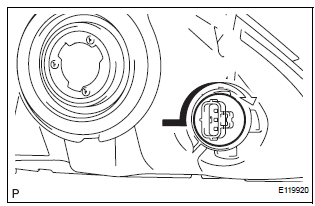
- Turn in the direction indicated by the arrow and install the front turn signal light bulb and front turn signal light socket as a unit.
4. INSTALL NO. 2 HEADLIGHT BULB
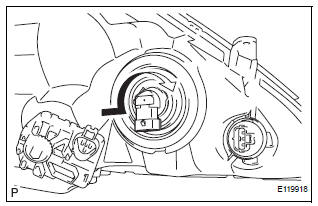
- Turn in the direction indicated by the arrow and install the No.2 headlight bulb.
5. INSTALL DISCHARGE HEADLIGHT BULB (DISCHARGE HEADLIGHT)
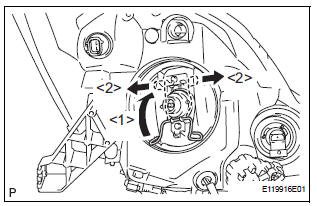
- Install the discharge headlight bulb with the set spring as shown in the illustration.
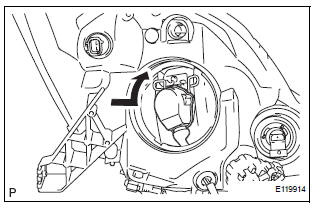
- Turn in the direction indicated by the arrow and install the socket.
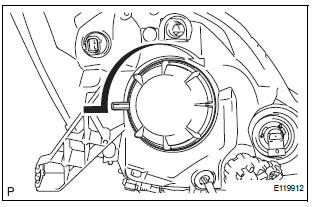
- Turn in the direction indicated by the arrow and install the headlight socket cover.
6. INSTALL NO. 1 HEADLIGHT BULB (HALOGEN HEADLIGHT)
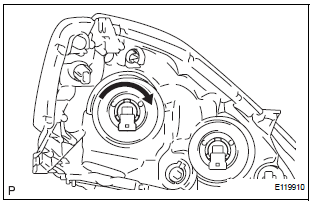
- Turn in the direction indicated by the arrow and install the No.1 headlight bulb.
 Adjustment
1. VEHICLE PREPARATION FOR HEADLIGHT AIMING
ADJUSTMENT
Prepare the vehicle:
Ensure there is no damage or deformation to the
body around the headlights.
Fill the fuel t ...
 Installation
1. INSTALL HEADLIGHT ASSEMBLY
Connect the connectors.
Install the headlight assembly with the bolt and 3
screws.
2. INSTALL FRONT BUMPER ASSEMBLY
3. CONNECT CABLE TO NEGATI ...
Other materials:
Short to B+ in Door System Communication
Bus Malfunction/ Short to GND in Door System Communication
Bus Malfunction
DTC B1214 Short to B+ in Door System Communication
Bus Malfunction
DTC B1215 Short to GND in Door System Communication
Bus Malfunction
DESCRIPTION
DTCs B1214 and B1215 are output when a short to +B or the body ground occurs
on the communication
bus. Detecting this condition disables all the ...
Using the steering
wheel switches
The steering wheel switches can be used to operate a connected
cellular phone.
Operating a telephone using the steering wheel switches
Volume switch
Increase/Decrease the volume
Press and hold:
Continuously increase/
decrease the volume
Cursor switch
Select a list/t ...
Removal
1. DISCONNECT CABLE FROM NEGATIVE BATTERY
TERMINAL
2. REMOVE V-BANK COVER SUB-ASSEMBLY (See
page EM-28)
3. REMOVE PURGE VSV
(a) Disconnect the purge VSV connector.
(b) Disconnect the 2 purge line hoses from the purge
VSV.
(c) Remove the purge VSV from the air cleaner hose.
(d) R ...
