
Toyota Sienna Service Manual: CD Sound Skips
INSPECTION PROCEDURE
1 CHECK CD
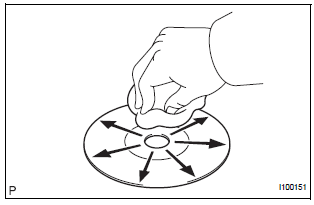
- Check the CD.
OK: The CD is clean.
HINT: If dirt is on the CD surface, wipe it clean with a soft cloth from the inside to the outside in a radial direction.
NOTICE: Do not use a conventional record cleaner or antistatic preservative.
2 CHECK CD
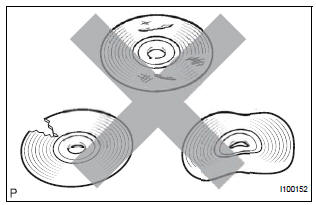
- Check that the CD is not deformed or cracked.
OK: No deformation or cracks on the CD.
3 CHECK OPERATION ANOTHER CD
- Check using another CD.
- Check if the problem recurs using another CD.
OK: The problem does not occur
4 CHECK RADIO AND NAVIGATION ASSEMBLY
- Check the radio and navigation assembly installation condition.
- Check that the radio and navigation assembly is properly installed.
OK: Radio and navigation assembly is properly installed.
REPLACE RADIO AND NAVIGATION ASSEMBLY
 CD cannot be Inserted / Played or CD is Ejected Right After Insertion
INSPECTION PROCEDURE
1 CHECK IF A PROPER CD IS INSERTED
Make sure that the CD is an audio CD or a CD with an
MP3 or WMA file, and that it is not deformed, flawed,
stained, burred, or otherwis ...
 Radio Broadcast cannot be Received or Poor Reception
INSPECTION PROCEDURE
1 CHECK RADIO AND NAVIGATION ASSEMBLY
Check the radio's automatic station search function.
Check the radio's automatic station search function
by activating it.
OK ...
Other materials:
Diagnostic trouble code chart
1. DTC CHECK
If a malfunction code is displayed during the DTC check ,
check the suspected area listed for that code in the table
below, and proceed to the appropriate page.
DIAGNOSTIC TROUBLE CODE CHART
DTC No.
Detection Item
Suspect Area
B1244
Light Se ...
How to proceed with
troubleshooting
HINT:
The intelligent tester can be used in steps 2, 3, 4, 6 and 9.
1 VEHICLE BROUGHT TO WORKSHOP
2 CONNECT INTELLIGENT TESTER TO DLC3
HINT:
If the display indicates a communication fault in the tester,
inspect the DLC3.
3 CHECK DTC AND FREEZE FRAME DATA
(a) Check for DTC(s) and freeze f ...
Open in Occupant Classification ECU Battery
Positive Line
DTC B1794 Open in Occupant Classification ECU Battery
Positive Line
DESCRIPTION
This circuit consists of the occupant classification ECU and the power source
circuit (battery, fuse, wire
harness).
DTC B1794 is recorded when a malfunction is detected in the occupant
classification ECU or t ...
