
Toyota Sienna Service Manual: Removal
1. Remove v-bank cover sub-assembly (see page em-28) 2. Remove front wheel rh 3. Remove no. 1 Engine under cover (see page em-26) 4. Remove front fender apron seal rh (see page em-26) 5. Drain engine coolant (see page co-6) 6. Remove no. 2 Air cleaner inlet (see page em- 28) 7. Remove battery (see page em-26) 8. Remove front bumper assembly (see page et-3) 9. Remove front bumper energy absorber 10. Remove no. 1 Air cleaner inlet (see page em- 28) 11. Disconnect radiator reserve tank hose or pipe (see page co-28) 12. Disconnect no. 1 Radiator hose (see page co- 28) 13. Disconnect no. 2 Radiator hose (see page co- 29) 14. Remove hood lock release lever protector (see page co-29) 15. Remove hood lock assembly (see page co-29) 16. Remove hood lock support sub-assembly (see page co-29) 17. Disconnect cooling fan ecu connector (see page co-30) 18. Remove radiator upper support subassembly (see page co-30) 19. Disconnect no. 2 Oil cooler outlet tube sub-assembly (see page co-31) 20. Remove headlight assembly rh (see page li- 69)
21. Remove radiator side deflector rh (see page co-31) 22. Remove headlight bracket rh (see page co- 32) 23. Remove pressure feed tube assembly (see page co-32)
24. REMOVE RADIATOR SUPPORT CUSHION (See page CO-32) 25. REMOVE NO. 1 RADIATOR SUPPORT (See page CO- 32) 26. REMOVE RADIATOR ASSEMBLY WITH FAN SHROUD AND FAN MOTOR (See page CO-33) 27. REMOVE V-RIBBED BELT (See page EM-6) 28. REMOVE GENERATOR ASSEMBLY
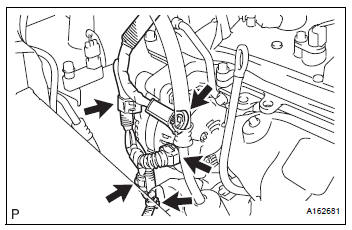
(a) Remove the terminal cap.
(b) Remove the nut and disconnect the wire harness from terminal B.
(c) Disconnect the generator connector from the generator assembly.
(d) Disconnect the connector from the compressor and magnetic clutch.
(e) Disconnect the 2 wire harness clamps.

(f) Remove the 2 bolts.
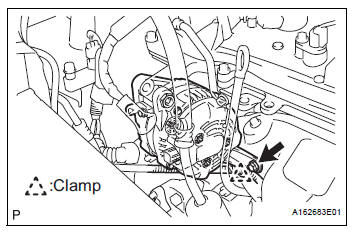
(g) Remove the bolt from the cylinder block.
(h) Disconnect the wire harness clamp and remove the generator assembly.

(i) Remove the bolt and wire harness clamp stay.

(j) Remove the bolt and bracket.
 Components
...
 Disassembly
1. REMOVE GENERATOR CLUTCH PULLEY
(A) using a screwdriver, remove the generator pulley
cap.
(b) Set SST (A) and (B).
SST 09820-63020
(c) Clamp SST (A) in a vise.
NOTICE:
...
Other materials:
Installation
1. INSTALL REAR DOOR WINDOW FRAME MOULDING
Remove the tape from the rear door window frame
moulding.
Clean the contact surface of the vehicle body with
white gasoline.
Clean the outer circumference of the rear door
window frame moulding with white gasoline.
Apply new double-sided ...
A/C ECU Communication Stop
DTC B1262 A/C ECU Communication Stop
DESCRIPTION
DTC B1262 is output when communication between the A/C amplifier and the
multiplex network gateway
ECU stops for more than 10 seconds.
DTC No.
DTC Detection Condition
Trouble Area
B1262
A/C ECU communicat ...
Reassembly
1. INSTALL REAR DOOR WIRE SUB-ASSEMBLY LH
Install the wire.
NOTICE:
When installing the wire, push the areas where
the clips are installed in order to prevent
damage and deformation.
Install the 2 screws.
2. INSTALL REAR DOOR LOCK ASSEMBLY LH
Apply MP grease to the slidi ...
