
Toyota Sienna Service Manual: Scratched / Reversed Disc
DTC 44-46 Scratched / Reversed Disc
DESCRIPTION
|
DTC No. |
DTC Detecting Condition |
Trouble Area |
|
44-46 |
Scratches or dirt is found on DVD surface or DVD is set upside down. |
|
INSPECTION PROCEDURE
HINT: After the inspection is completed, clear the DTCs.
1 CHECK THAT DISC IS INSERTED PROPERLY
- Check whether or not the disc is inserted upside down.
OK: Disc is properly inserted
2 CHECK DISC
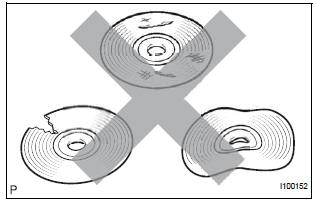
- Check that the disc is not deformed or cracked.
OK: No deformation or cracks on the disc.
3 DISC CLEANING
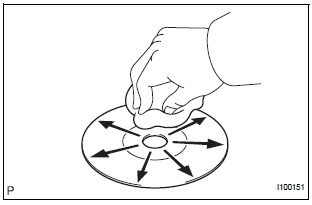
- Disc cleaning
- If dirt is on the disc surface, wipe it clean with a soft cloth from the inside to the outside in a radial direction.
NOTICE: Do not use a conventional record cleaner or anti-static preservative.
4 CLEAR DTC
- Clear the DTCs
5 RECHECK DTC
- Recheck for DTCs and check if the same trouble occurs again.
OK: Malfunction disappears.
6 REPLACE DISC WITH ANOTHER AND RECHECK
- Replace the disc with another and recheck.
- Replace the disc with another normal one.
- Clear the DTCs.
- Recheck for DTCs and check if the same trouble occurs again.
OK: Malfunction disappears.
END
 Eject Error/ Elevator Error/ Clamp Error
DTC 44-45 Eject Error
DTC 44-51 Elevator Error
DTC 44-52 Clamp Error
DESCRIPTION
DTC No.
DTC Detecting Condition
Trouble Area
44-45
Disc cannot be ejected.
...
 High Temperature
DTC 44-47 High Temperature
DESCRIPTION
DTC No.
DTC Detecting Condition
Trouble Area
44-47
Sensor detects that DVD unit temperature is high.
(Over 80C)
...
Other materials:
Circuit inspection
A description of the main areas of each circuit inspection
is shown in the table below.
Item
Description
Circuit Description
The major role, operation of the circuit and its component parts are
explained.
Diagnostic Trouble Code No. and Detection item
Indicates ...
Insufficient Coolant Temperature for Closed
Loop Fuel Control
DTC P0125 Insufficient Coolant Temperature for Closed
Loop Fuel Control
DESCRIPTION
Refer to DTC P0115
DTC No.
DTC Detection Condition
Trouble Area
P0125
Engine coolant temperature (ECT) does not reach
closed-loop enabling temperature for 20 minutes (t ...
CAN Bus Line
DESCRIPTION
When any DTC for the CAN communication system is output, first measure the
resistance between the
terminals of the DLC3 to specify the trouble area, and check that there is no
short in the CAN main wire,
between the main wire, and +B or GND.
WIRING DIAGRAM
INSPECTION PRO ...
