
Toyota Sienna Service Manual: Tire Pressure Warning Light Circuit
DESCRIPTION
If the ECU detects trouble, the tire pressure warning light blinks (comes on after blinking for 1 minute) and tire pressure monitor is cancelled at the same time. At this time, the ECU records a DTC in the memory.
Connect terminals TC and CG of DLC3 to make the tire pressure warning light blink and output the DTC.
WIRING DIAGRAM
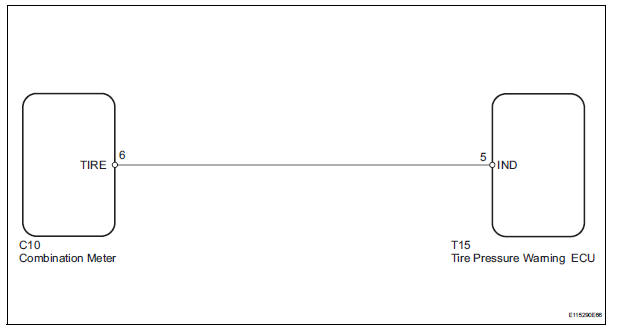
INSPECTION PROCEDURE
NOTICE: When replacing the tire pressure warning ECU, read the transmitter IDs stored in the old ECU using the intelligent tester and write them down before removal.
It is necessary to perform initialization (See page TW-23) after registration (See page TW-20) of the transmitter IDs into the tire pressure warning ECU, after the ECU has been replaced.
HINT: This procedure must be performed according to the PROBLEM SYMPTOMS TABLE.
1 CHECK HARNESS AND CONNECTOR (COMBINATION METER - TIRE PRESSURE WARNING ECU)
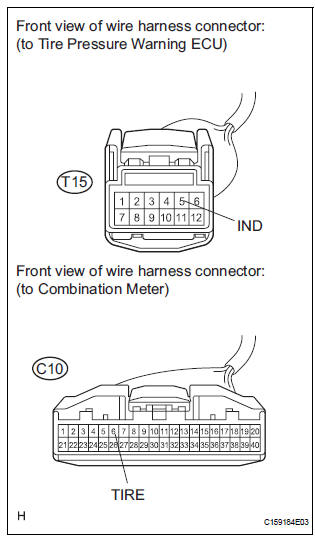
(a) Disconnect the C10 combination meter connector.
(b) Disconnect the T15 tire pressure warning ECU connector.
(c) Measure the resistance according to the value(s) in the table below.
Standard resistance 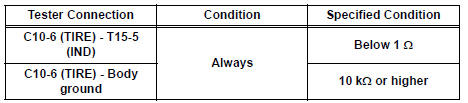


2 INSPECT COMBINATION METER

(a) Disconnect the connector from the tire pressure warning ECU.
(b) Turn the ignition switch to the ON position, and check if the tire pressure warning light illuminates.
Result 


REPLACE TIRE PRESSURE WARNING ECU (See page TW-87)
 Tire Pressure Warning Reset Switch Circuit
DESCRIPTION
The ECU enters the initialization mode and performs initialization
automatically, when the tire pressure
warning ECU receives the signal from the tire pressure warning reset switch. If ...
 ECU Power Source Circuit
DESCRIPTION
This is the power source for the tire pressure warning ECU.
WIRING DIAGRAM
INSPECTION PROCEDURE
NOTICE:
When replacing the tire pressure warning ECU, read the transmitter IDs
st ...
Other materials:
Installation
1. INSTALL 3 POINT TYPE NO. 2 REAR SEAT BELT ASSEMBLY
Check the degree of tilt when the belt begins to lock
the ELR.
Check that the belt does not lock within 15 of
tilt in all directions but that the belt locks with
over 45 of tilt, when gently moving the
retractor.
If ...
Disposal
HINT:
Use the same procedures for the RH side and LH side.
The procedures listed below are for the LH side.
When scrapping a vehicle equipped with the SRS or
disposing of the front seat side airbag assembly, be sure to
deploy the airbag first in accordance with the proc ...
Oxygen Sensor Heater Control Circuit Low/ Oxygen Sensor Heater Control
Circuit High/ Oxygen Sensor Heater Circuit Malfunction
DTC P0037 Oxygen Sensor Heater Control Circuit Low
(Bank 1 Sensor 2)
DTC P0038 Oxygen Sensor Heater Control Circuit High
(Bank 1 Sensor 2)
DTC P0057 Oxygen Sensor Heater Control Circuit Low
(Bank 2 Sensor 2)
DTC P0058 Oxygen Sensor Heater Control Circuit High
(Bank 2 Sensor 2)
DTC P0141 Oxyg ...
