
Toyota Sienna Service Manual: Wrong Disc/ Disc cannot be Read
DTC 63-41 Wrong Disc
DTC 63-42 Disc cannot be Read
DESCRIPTION
|
DTC No. |
DTC Detection Condition |
Trouble Area |
| 63-41 | An unsuitable disc is inserted |
|
| 63-42 | The disc cannot be read |
INSPECTION PROCEDURE
HINT: After the inspection is completed, clear the DTCs.
1 CHECK DISC
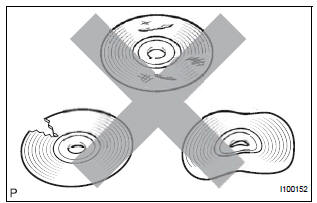
- Check that the disc is not deformed or cracked.
OK: No deformations or cracks on the disc.
2 DISC CLEANING
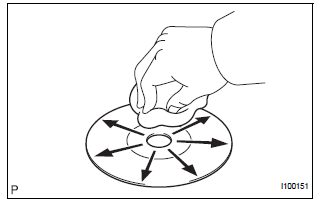
- Disc cleaning
- If dirt is on the disc surface, wipe it clean with a soft cloth from the inside to outside in a radial direction.
NOTICE: Do not use a conventional record cleaner or anti-static preservative
3 CLEAR DTC
- Clear the DTCs
4 RECHECK DTC
- Recheck for DTCs and check if the same trouble occurs again.
OK: Malfunction disappears
5 REPLACE DISC WITH ANOTHER AND RECHECK
- Replace the disc with another and recheck.
- Replace the disc with another normal one.
- Clear the DTCs.
- Recheck for DTCs and check if the same trouble occurs again.
OK: Malfunction disappears.
END
 CD Changer Mechanical Error/ CD Insertion and Ejection Error/ CD Reading
Abnormal
CD Changer Mechanical Error/ CD Insertion and Ejection Error/ CD Reading
Abnormal
DTC 63-10 CD Changer Mechanical Error
DTC 63-11 CD Insertion and Ejection Error
DTC 63-12 CD Reading Abnormal
DESCRIPTION
DTC No.
DTC Detection Condition
Trouble Area
...
 CD-ROM Abnormal
DTC 63-43 CD-ROM Abnormal
DESCRIPTION
DTC No.
DTC Detection Condition
Trouble Area
63-43
CD-ROM operation is abnormal
CD
Radio and navigation ...
Other materials:
Inspection
1. INSPECT UNDERDRIVE PACK CLEARANCE
(a) Install the underdrive clutch to the transaxle case.
NOTICE:
Be careful not to damage the oil seal rings.
(b) Install a dial indicator as shown in the illustration.
(c) Measure the underdrive clutch pack clearance while
applying and releasing comp ...
Problem symptoms table
HINT:
Proceed to the troubleshooting for each circuit in the table
below.
AIRBAG SYSTEM
Symptom
Suspected Area
The SRS warning light goes off after the primary
check, but then comes on.
SRS Warning Light Remains ON
When the ignition switch is turned to t ...
Sound Signal Circuit between Radio and Navigation Assembly and
Television Display Assembly
DESCRIPTION
The television display assembly sends an RSE sound signal to the radio and
navigation assembly through
this circuit. The sound signal that has been sent is amplified by the stereo
component amplifier, and then
is sent to the speakers.
If there is an open or short in the circuit ...
