
Toyota Sienna Service Manual: Zero Point Calibration of Yaw Rate Sensor Undone
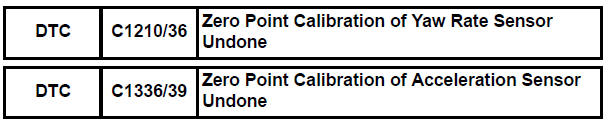
DESCRIPTION
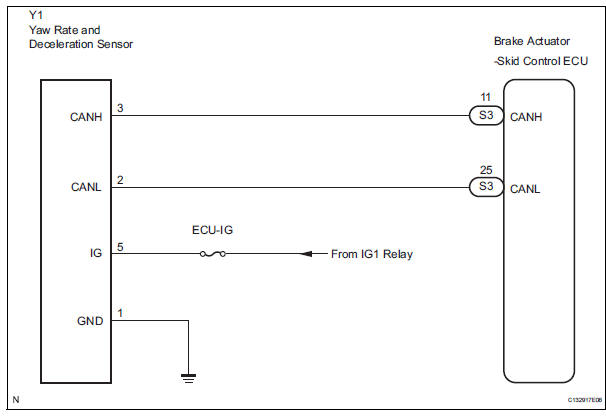
The skid control ECU receives signals from the yaw rate sensor via CAN communication system.
Yaw rate sensor has the built-in deceleration sensor.
If there is trouble in the bus lines between the yaw rate and deceleration sensor and CAN communication system, the DTC U0123/62 (yaw rate sensor communication trouble) and U0124/95 (deceleration sensor communication trouble) are output.
The DTC is also output when the calibration has not been completed.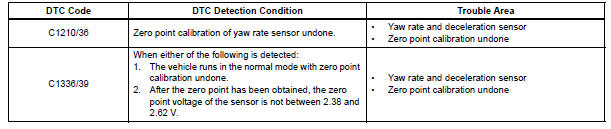
WIRING DIAGRAM
INSPECTION PROCEDURE
HINT: When U0073/94, U0100/65, U0123/62, U0124/95 or U0126/63 are output accompanied with C1210/36 or C1336/39, inspect and repair the trouble areas indicated by U0073/94, U0100/65, U0123/62, U0124/95 or U0126/63 first.
1 PERFORM ZERO POINT CALIBRATION OF YAW RATE AND DECELERATION SENSOR
(a) Perform the zero point calibration of the yaw rate and deceleration sensor (See page BC-70).

2 RECONFIRM DTC
(a) Clear the DTCs (See page BC-82).
(b) Turn the ignition switch to the ON position.
(c) Are the same DTCs recorded (See page BC-82).
Result


3 CHECK YAW RATE AND DECELERATION SENSOR INSTALLATION
(a) Check that the yaw rate and deceleration sensor has been installed properly (See page BC-197).
NOTICE: When replacing the yaw rate and deceleration sensor, perform zero point calibration (See page BC- 70).


REPLACE YAW RATE AND DECELERATION SENSOR
 ECM Communication Circuit Malfunction
DTC C1203/53 ECM Communication Circuit Malfunction
DESCRIPTION
The circuit is used to send TRAC and VSC control information from the skid
control ECU to the ECM, and
engine control information fr ...
 SM Solenoid Circuit
DTC C1225/25 SM Solenoid Circuit
DESCRIPTION
This solenoid turns on when receiving signals the ECU and controls the
pressure acting on the wheel
cylinders to control the braking force.
WIRIN ...
Other materials:
Removal
NOTICE:
Do not adjust the brake booster push rod.
Do not change the combination of the diameter
converting unit and brake.
1. DRAIN BRAKE FLUID
NOTICE:
Wash the brake fluid off immediately if it attaches to
any painted surfaces.
2. SEPARATE BATTERY NEGATIVE TERMINAL
3. REMOVE AIR CLE ...
Removal
1. REMOVE ENGINE AND TRANSAXLE
HINT:
(See page EM-26)
2. REMOVE AUTOMATIC TRANSMISSION WITH
TRANSFER
HINT:
(See page AX-164)
3. REMOVE NO. 1 TRANSFER CASE PLUG
(a) Remove the No. 1 transfer case plug.
(b) Remove the No. 1 gasket from the transfer case No.
1 plug.
4. REMOVE NO. 2 T ...
Short in Side Squib RH Circuit
DTC B0110/43 Short in Side Squib RH Circuit
DESCRIPTION
The side squib RH circuit consists of the center airbag sensor assembly and
the front seat side airbag
assembly RH.
The circuit instructs the SRS to deploy when deployment conditions are met.
DTC B0110/43 is recorded when a short cir ...
