
Toyota Sienna Service Manual: Active test
HINT:
Performing an ACTIVE TEST enables components including the relays, VSV (Vacuum Switching Valve), and actuators, to be operated without removing any parts.
The ACTIVE TEST can be performed with an intelligent tester. Performing an ACTIVE TEST in the first step in troubleshooting is one method to shorten diagnostic time.
DATA LIST can be displayed during ACTIVE TESTs.
(a) Connect an intelligent tester to the DLC3.
(b) Start the engine.
(c) Turn the tester ON.
(d) Select the following menu items: DIAGNOSIS / ENHANCED OBD II / ACTIVE TEST.
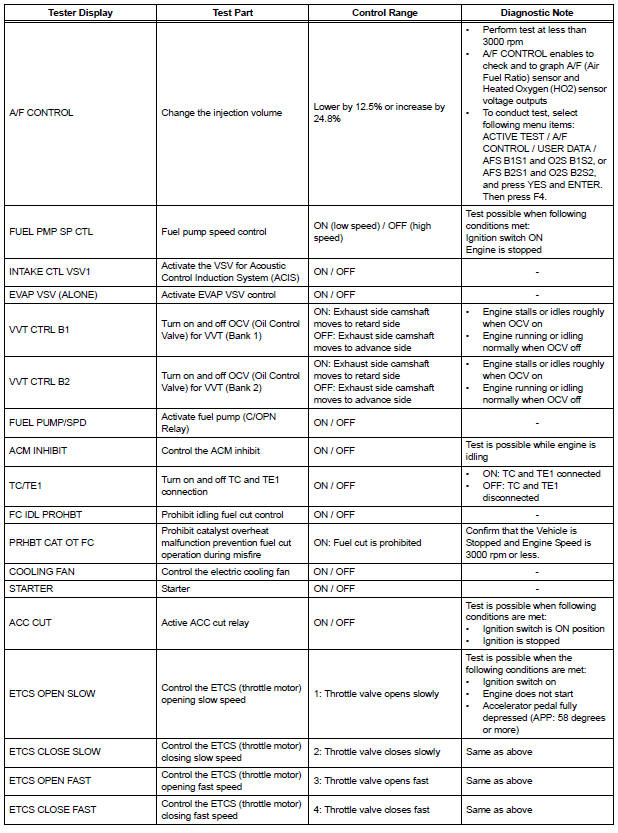
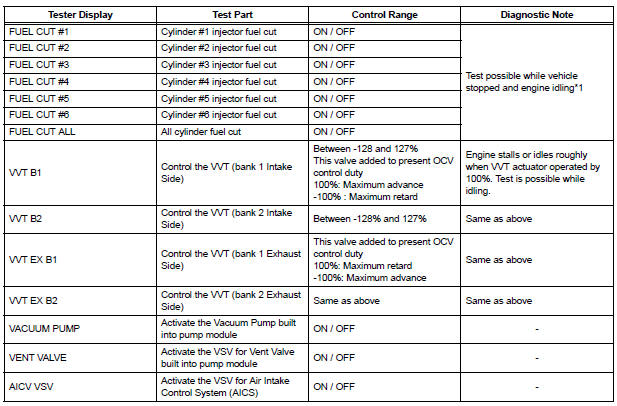
(e) Perform the ACTIVE TEST by referring to the table below.

NOTICE:
(a)Stop the engine and turn the ignition switch ON to turn FUEL CUT#1 (to #6) ON. (b)Start the engine. |
 Data list
HINT:
Reading the DATA LIST displayed on an intelligent tester
enables values, including those of the switches, sensors,
and actuators, to be checked without removing any
parts. Reading the DATA L ...
 System check
HINT:
Performing a SYSTEM CHECK enables the system,
which consists of the multiple actuators, to be operated
without removing any parts. In addition, it can show
whether or not any DTCs are set, a ...
Other materials:
Dtc clear
(A) when using the obd ii scan tool or intelligent
tester: clearing the dtcs.
(1) Connect the intelligent tester together with the
CAN VIM (controller area network vehicle
interface module) to the DLC3.
(2) Turn the ignition switch to the ON position and
turn the OBD II scan tool or the inte ...
Removal
1. REMOVE BACK DOOR GARNISH CENTER
2. REMOVE BACK DOOR SIDE GARNISH LH
3. REMOVE BACK DOOR SIDE GARNISH RH
4. REMOVE BACK DOOR STRAP COVER
5. REMOVE BACK DOOR PULL STRAP
6. REMOVE BACK DOOR TRIM BOARD ASSEMBLY
7. REMOVE BACK DOOR SERVICE HOLE PLATE
8. REMOVE REAR SPOILER COVER (W/ REAR
SPOIL ...
Fuel information
You must only use unleaded gasoline in your vehicle.
Select octane rating 87 (Research Octane Number 91) or higher.
Use of unleaded gasoline with an octane rating lower than 87
may result in engine knocking. Persistent knocking can lead to
engine damage.
At minimum, the gasoline you use s ...
