
Toyota Sienna Service Manual: CD cannot be Inserted / Played or CD is Ejected Right After Insertion
INSPECTION PROCEDURE
1 CHECK IF A PROPER CD IS INSERTED
- Make sure that the CD is an audio CD or a CD with an MP3 or WMA file, and that it is not deformed, flawed, stained, burred, or otherwise defective.
OK: Normal CD
HINT:
- Translucent or uniquely-shaped CDs cannot be played.
- Commercial audio CDs can be played.
- CD-DA files on CD-ROMs, CD-Rs, and CD-RWs can be played.
- MP3 and WMA files on CD-ROMs, CD-Rs and CDRWs can be played.
- For details on playable CDs, refer to the Owner's Manual
2 CHECK THAT CD IS INSERTED PROPERLY
- Check whether or not the CD is inserted upside down.
OK: CD is properly inserted
3 CHECK CD
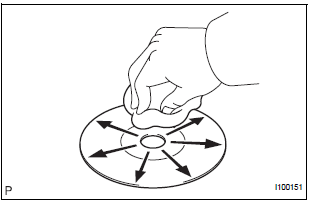
- Clean the disc by wiping it with a soft cloth from the inside to the outside in a radial direction.
OK: Malfunction disappears.
NOTICE: Do not use a conventional record cleaner or antistatic preservative.
4 REPLACE CD WITH ANOTHER AND RECHECK
- Replace the CD with a normal one and check that the malfunction disappears.
OK: Malfunction disappears
CD IS FAULTY
 CD cannot be Ejected
INSPECTION PROCEDURE
1 CHECK OPERATION
Press the disc eject switch of the radio receiver for 5
seconds or more and check that the CD is ejected.
OK:
CD is ejected
2 REPLACE CD WITH ANOTHER ...
 CD Sound Skips
INSPECTION PROCEDURE
1 CHECK CD
Check the CD.
OK:
The CD is clean.
HINT:
If dirt is on the CD surface, wipe it clean with a soft cloth
from the inside to the outside in a radial directio ...
Other materials:
Diagnosis display detailed
description
HINT:
This section contains a detailed description of displays
within diagnostic mode.
Illustrations may differ from the actual vehicle depending
on the device settings and options. Therefore, some
detailed areas may not be shown exactly the same as on
the actual vehicle.
...
Hood
Release the lock from the inside of the vehicle to open the hood.
Pull the hood lock release lever.
The hood will pop up slightly.
Pull up the auxiliary catch lever
and lift the hood.
Hold the hood open by inserting
the supporting rod into the slot
WARNING ...
Data list
HINT:
Reading the DATA LIST displayed on an intelligent tester
enables values, including those of the switches, sensors,
and actuators, to be checked without removing any
parts. Reading the DATA LIST as the first step in
troubleshooting is one method to shorten diagnostic
time.
NOTICE: ...
