
Toyota Sienna Service Manual: Display does not Dim when Light Control Switch is Turned ON
INSPECTION PROCEDURE
1 CHECK IMAGE QUALITY SETTING
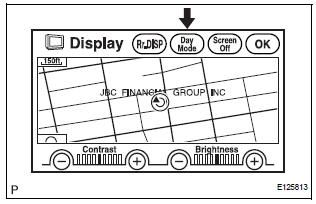
- Enter the display adjustment screen by pressing the "DISPLAY" switch.
- Turn the light control switch to the TAIL position.
- Check if "DAY MODE" on the display adjustment is ON.
OK: "DAY MODE" is ON.
TURN "DAY MODE" SETTING OFF
2 CHECK VEHICLE SIGNAL (DISPLAY CHECK MODE)
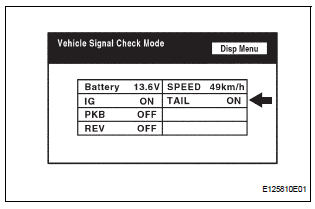
- Enter the "Display Check" mode (Vehicle Signal Check).
- Check that the display changes between ON and OFF according to the light control switch operation.
OK

HINT: The display is updated once per second. It is normal for the display to lag behind the actual switch operation.
REPLACE RADIO AND NAVIGATION ASSEMBLY
 Illumination for Panel Switch does not Come on with Tail Switch ON
INSPECTION PROCEDURE
1 CHECK VEHICLE SIGNAL (DISPLAY CHECK MODE)
Enter the "Display Check" mode (Vehicle Signal Check Mode).
Check that the display changes between ON and OF ...
 Panel Switches do not Function
INSPECTION PROCEDURE
1 CHECK PANEL SWITCH
Check for foreign matter around the switches that might
prevent operation.
OK:
No foreign matter is found
2 CHECK PANEL SWITCH (DISPLAY CHECK MODE ...
Other materials:
Removal
HINT:
Remove the RH side by the same procedure as the LH side.
1. REMOVE REAR WHEEL
2. REMOVE QUARTER TRIM PANEL ASSEMBLY
FRONT LH
HINT:
Remove the LH side by the same procedure as the RH
side (See page IR-9).
3. REMOVE REAR SPEED SENSOR
(a) Disconnect the speed sensor connector, and pu ...
Engine
GENERAL MAINTENANCE
HINT:
Inspect these items when the engine is cold.
1. INSPECT DRIVE BELT
HINT:
(See page EM-6)
2. REPLACE SPARK PLUGS
HINT:
(See page IG-8)
3. INSPECT AIR FILTER
(a) Remove the air filter.
(b) Visually check that the air filter is not excessively
damaged or oily ...
Services
Subscribers have the following Safety Connect services available:
Automatic Collision Notification*
Helps drivers receive necessary response from emergency service providers.
*: U.S. Patent No. 7,508,298 B2
Stolen Vehicle Location
Helps drivers in the event of vehicle theft.
Emergenc ...
