
Toyota Sienna Service Manual: DTC check / clear
1. CHECK DTC
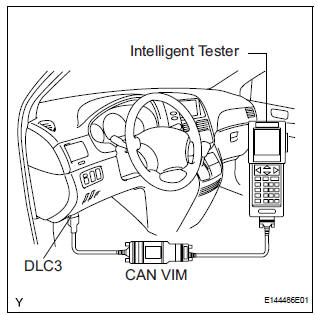
- Connect the intelligent tester to the Controller Area Network Vehicle Interface Module (CAN VIM). Then connect the CAN VIM to the DLC3.
- Turn the ignition switch on.
- Turn the tester ON.
- Enter the following menu items: DIAGNOSIS / OBD/ MOBD / IMMOBILISER / DTC INFO / CURRENT CODES.
- Check the DTC(s) and freeze frame data, and then write down.
- Check the details of the DTC(s).
2. CLEAR THE DTC
- Connect the intelligent tester (with CAN VIM) to the DLC3.
- Turn the ignition switch on.
- Turn the tester ON.
- Enter the following menu items: DIAGNOSIS / OBD/ MOBD / IMMOBILISER / DTC INFO / CLEAR CODES.
- Press the YES button.
 Diagnosis system
1. CHECK DLC3
The vehicle's ECU uses ISO 15765-4 for
communication protocol. The terminal arrangement
of the DLC3 complies with SAE J1962 and matches
the ISO 15765-4 format.
...
 Data list / active test
1. READ DATA LIST
HINT:
Using the DATA LIST displayed on the intelligent tester,
you can read the value of the switch, sensor, actuator,
etc. without parts removal. Reading the DATA LIST as
the f ...
Other materials:
Heated oxygen sensor (for 2wd)
Components
Removal
1. DISCONNECT CABLE FROM NEGATIVE BATTERY
TERMINAL
CAUTION:
Wait at least 90 seconds after disconnecting the
cable from the nagative (-) battery terminal to
prevent airbag and seat belt pretensioner activation.
2. REMOVE HEATED OXYGEN SENSOR (for Bank ...
Oxygen Sensor Heater Control Circuit Low/ Oxygen Sensor Heater Control
Circuit High/ Oxygen Sensor Heater Circuit Malfunction
DTC P0037 Oxygen Sensor Heater Control Circuit Low
(Bank 1 Sensor 2)
DTC P0038 Oxygen Sensor Heater Control Circuit High
(Bank 1 Sensor 2)
DTC P0057 Oxygen Sensor Heater Control Circuit Low
(Bank 2 Sensor 2)
DTC P0058 Oxygen Sensor Heater Control Circuit High
(Bank 2 Sensor 2)
DTC P0141 Oxyg ...
Removal
1. REMOVE FRONT WHEEL
2. REMOVE FRONT AXLE HUB LH NUT
HINT:
(See page AH-4)
SST 09930-00010
3. SEPARATE SPEED SENSOR FRONT LH
HINT:
(See page AH-4)
4. SEPARATE FRONT DISC BRAKE CALIPER
ASSEMBLY LH
HINT:
(See page AH-4)
5. REMOVE FRONT DISC
6. SEPARATE TIE ROD ASSEMBLY LH
HINT:
(See pa ...
